What This Article Covers
- What back button hijacking is and exactly how it works technically
- The SEO consequences: manual actions, SpamBrain demotions, and E-E-A-T damage
- The paid ads risk: Google Ads account suspension and wasted spend
- The hidden threat: third-party scripts hijacking your users without your knowledge
- Your 3-step compliance action plan before the June 15 deadline
Summary
Google officially classifies back button hijacking as a malicious spam practice starting June 15, 2026.
Sites that interfere with browser navigation face manual spam actions, algorithmic demotions, and Google Ads restrictions.
Third-party scripts on your site are YOUR responsibility — even if you did not write them.
What Is Back Button Hijacking — And Why Did Google Finally Act?
We have all been there. You land on a page, realize it is not what you needed, and hit the back button to return to your search results. But instead of going back, you land on a page you never asked for — a special offer, a newsletter signup, or a reload loop that keeps you trapped on the site.
This is back button hijacking: a dark-pattern technique that has been abused by aggressive marketers for years to artificially inflate page views and force engagement. Until now, Google treated it as a nuisance. Starting June 15, 2026, Google is treating it as spam.
Google’s official policy announcement makes this explicit: sites that abuse the browser’s History API to interfere with normal navigation will be subject to manual spam actions and algorithmic demotions. The free ride is over.
Official Source: Google’s Back Button Hijacking Policy (developers.google.com)
How Back Button Hijacking Works (And Why Google Cares)
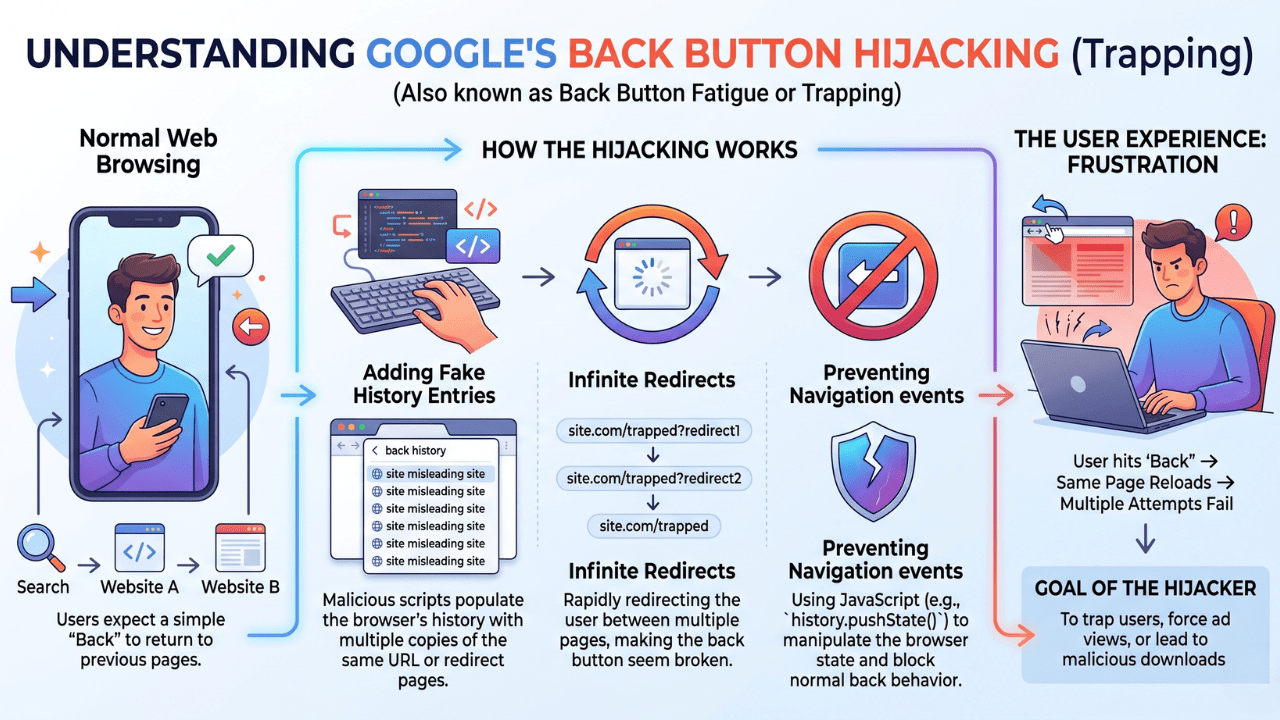
Understanding the mechanism matters because it determines whether your site is at risk — even unintentionally. The technique exploits two browser History API methods:
The Technical Mechanism
pushState() — Silently adds a new, fake entry to the browser’s history stack without triggering a real page load.
replaceState() — Overwrites the current history entry, effectively erasing the user’s ability to go “back” to where they came from.
Result: When a user presses the back button, the browser navigates to the injected fake entry rather than the actual previous page.
Once a site has injected fake history entries, it can use them to:
- Force the user to stay on the current page by looping them back repeatedly.
- Redirect to an unsolicited ad or affiliate page to capture impressions or attribution cookies.
- Create an escape loop that makes leaving the site impossible without closing the browser tab entirely.
Google’s core mission is a safe, user-controlled browsing experience. When a site hijacks the back button, it breaks user trust — not just in the offending website, but in the search engine that surfaced it. This is precisely why Google’s response is now a formal spam enforcement action rather than a soft ranking signal.
The SEO Impact: From "Nuisance" to "Nuclear Option"
For years, Google acknowledged back button hijacking as a bad user experience but stopped short of explicit ranking penalties. That changes on June 15, 2026. Here is what the enforcement now looks like across three layers.
Manual Spam Actions
Human reviewers at Google can now issue manual spam actions against your domain for confirmed hijacking behavior. A manual action means:
- Your site can be partially or completely removed from Google Search results.
- Recovery requires fixing the violation and filing a reconsideration request through Google Search Console — a process that can take weeks.
- Your entire domain’s authority is at risk, not just the offending page.
Algorithmic Demotions via SpamBrain
Google’s automated spam detection system, SpamBrain, will now pattern-match for History API abuse at scale. This means:
- No human reviewer needed — the demotion is automatic and immediate once detected.
- Sites may see ranking drops across all their pages, not just the page where hijacking occurs.
- Recovery from algorithmic demotions is slower and less predictable than resolving a manual action.
Destruction of E-E-A-T Signals
Trust is the cornerstone of Google’s E-E-A-T framework (Experience, Expertise, Authoritativeness, Trustworthiness). Trapping a user is the most direct possible signal that your site is untrustworthy. Any gains you have built through content, backlinks, and brand authority can be eroded by a single deceptive navigation pattern.
For a full breakdown of how E-E-A-T impacts your rankings and what Google actually measures: What Is E-E-A-T and Its Role in SEO.
Also see how related enforcement has evolved: Google’s March 2026 Spam Update: What Changed and Google’s February 2026 Core Update.
Is Your Site at Risk? Find Out Before June 15.
Our free SEO audit scans for spam signals, third-party script risks, and technical issues that could trigger a Google penalty — including back button hijacking patterns.
→ Get Your Free SEO Audit Report →
No commitment. Results delivered within 24 hours.
The Paid Ads Impact: Double Jeopardy for Advertisers
If you run Google Ads alongside your organic strategy, the stakes are significantly higher. The same policy enforcement that demotes your organic rankings can also cut off your paid traffic entirely.
Google Ads Eligibility Restrictions
Sites that receive manual spam actions for hijacking may simultaneously face Google Ads account-level restrictions. This can mean:
- Ad disapprovals across your entire campaign portfolio.
- Account suspension, cutting off your primary paid lead-generation channel with no immediate recourse.
- Reinstatement requires resolving the underlying violation and appealing the restriction separately — compounding the recovery timeline.
Wasted Ad Spend on a Broken Experience
There is also a straightforward conversion logic problem: if you are paying for a click and then trapping the user on your site, your conversion rates will crater. Frustrated users do not buy. They bounce, block, and never return. You are spending money to actively damage your brand.
Track exactly where paid and organic traffic converts — and where it abandons — using the attribution framework in our guide: Website Analytics in 2026: The GA4, GTM, GSC & GMB Guide.
The "Third-Party" Trap: Are You Hijacking Without Knowing It?
This is where many legitimate businesses are most at risk. Google has been explicit: site owners are responsible for all code on their website, regardless of who wrote it or where it came from.
You Can Be Penalized for Code You Did Not Write
If a third-party script on your site triggers back button hijacking, the penalty applies to YOUR domain.
Claiming ignorance or blaming a vendor does not protect you from a manual spam action.
Google’s policy holds the domain owner accountable — period.
The three most common sources of hidden hijacking behavior:
1. Aggressive Ad Networks
Some third-party ad libraries silently inject History API calls to inflate their own impression counts and CPM rates. They benefit; you take the penalty. This is especially common with lower-tier programmatic networks prioritizing revenue over compliance.
2. Exit-Intent Plugins
Poorly coded “wait, don’t leave!” pop-up plugins can inadvertently trigger history manipulation when attempting to intercept the back-button event. Even well-intentioned UX features can cross the line if they are implemented without checking for History API abuse.
3. Affiliate Widgets & Attribution Scripts
Some affiliate tracking widgets silently redirect users through their own domain using replaceState() to capture attribution cookies before the user leaves. The user experiences a hijacked back button; the affiliate captures a commission click. Again — your domain, your penalty.
How to Identify Hidden Hijacking in Your Tag Stack
- Open Chrome DevTools → Application tab → Session Storage. Look for unexpected history entries being created.
- In the Console tab, search for calls to history.pushState or history.replaceState in your loaded scripts.
- In Google Tag Manager, audit every tag — especially ad network tags, affiliate scripts, and exit-intent triggers.
- Test on mobile: tap 3–5 pages deep, then repeatedly tap the back button and watch where you land.
Your 3-Step Compliance Action Plan (Before June 15)
You have a clear, finite deadline. Here is exactly what to do with the time remaining.
Step 1 — User Test on Real Devices
Do not rely solely on developer tools. Open your website on both a mobile phone and a desktop browser. Navigate at least three pages deep into your site, then press the back button at each step. Ask these questions:
- Do you return exactly to the previous page, or land somewhere unexpected?
- Does the back button respond on the first press, or does it require multiple taps?
- Are you ever redirected to a page you did not navigate to voluntarily?
Any deviation from expected behavior is a red flag requiring immediate investigation.
Step 2 — Audit Every Third-Party Script
This is where the hidden risk lives. Pull a complete inventory of every tag firing on your site:
- Export all tags from Google Tag Manager and flag any from ad networks, affiliate programs, or exit-intent tools.
- Use browser DevTools (Application > Session Storage and Sources > Search) to find any script calling pushState or replaceState.
- Cross-reference your findings with the ad network’s compliance documentation. If they cannot confirm compliance with Google’s new policy, remove or replace the tag immediately.
Step 3 — Consult a Technical SEO Expert
If your audit surfaces issues you cannot confidently resolve in-house, do not wait for a Search Console warning. At that point, the penalty has already been issued. Proactive resolution is always faster than post-penalty recovery.
At c3digitus, our Technical SEO and Visibility services include a full compliance audit covering History API abuse, Core Web Vitals, structured data, and the full E-E-A-T signal stack. We also offer complete Website Design & Development for sites that need structural changes to meet the new policy standards.
Conclusion: Your Site Should Be a Bridge, Not a Cage
In B2B and industrial marketing, your reputation for reliability is your most valuable asset. A deceptive navigation pattern does not just damage your SEO rankings — it signals to every potential client who encounters it that you are a risky partner. The kind of partner who prioritizes trapping people over earning their trust.
Google’s June 15 enforcement is a clear alignment with what your best customers already expect: a site that respects their time, their choices, and their ability to leave.
Clean your stack. Test your back button. Make sure your site is exactly what it appears to be: a trustworthy resource your customers choose to return to — not a trap they stumble into.
The Countdown Is On. You have until June 15, 2026. Use the time.
Do Not Wait for a Search Console Warning.
By the time Google issues a manual action, your rankings and your Ads account may already be affected. Our proactive compliance audit finds issues before they become penalties.
→ Get Your Free SEO Report Now →
Or explore our full Technical SEO services to learn how we protect industrial brands from algorithmic risk.
Frequently Asked Questions
What is back button hijacking?
Back button hijacking is a deceptive technique where a website interferes with normal browser navigation, causing users to stay trapped on the site or be redirected when they try to go back.
Is Google penalizing back button hijacking in 2026?
Yes. Google officially classifies back button hijacking as a spam practice starting June 15, 2026, with possible manual actions, algorithmic demotions, and ad restrictions.
Can third-party scripts cause a Google penalty?
Yes. If ad tags, affiliate widgets, or plugins on your site trigger back button hijacking, Google can still hold your domain responsible.
How can I check if my site has back button hijacking?
Test your website on desktop and mobile, use Chrome DevTools, inspect Google Tag Manager tags, and watch for unusual redirects or repeated back-button loops.
Does back button hijacking affect Google Ads?
Yes. Sites violating spam policies may face ad disapprovals, account restrictions, or suspension in addition to organic ranking losses.
How do I fix back button hijacking issues?
Audit and remove non-compliant scripts, test browser navigation behavior, and work with a technical SEO expert to resolve code conflicts before penalties occur.