Blog
Facebook isn’t just another social media platform. It’s a place where a huge part of the world spends a noticeable chunk of their day.
To put it in perspective, Facebook has around 1.56 billion daily active users. That’s almost five times the population of the United States and close to 20% of the world’s population logging in every single day—and that number keeps growing.
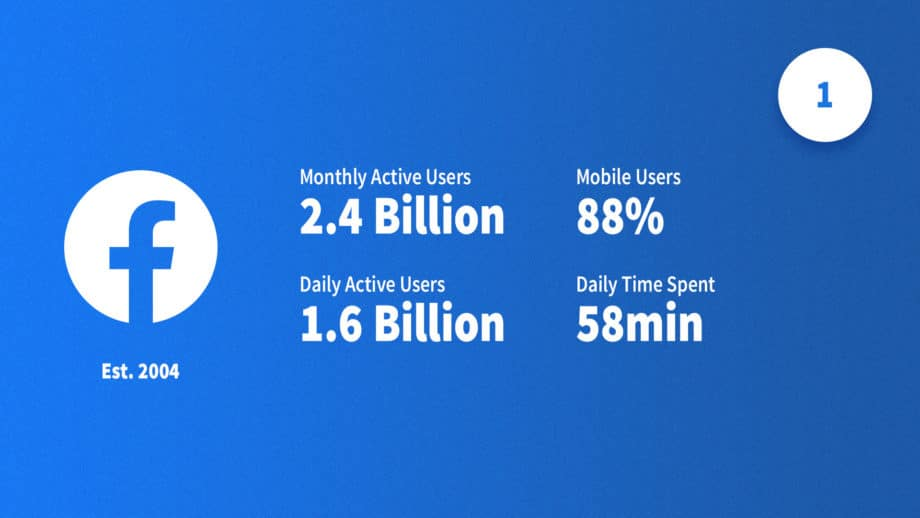
But the real story isn’t just how many people are on Facebook. It’s how much time we give it.
On average, people spend nearly an hour a day scrolling through Facebook—watching videos, checking updates, reacting to posts, and interacting with brands without even thinking about it. If the average person sleeps about eight hours a night, that means roughly 7% of our waking time is spent on one platform. Very few marketing channels can claim that kind of attention.
And that’s exactly why Facebook matters for businesses.
This is where recommendations spread, brands get noticed, opinions are formed, and buying decisions often start. Whether it’s someone discovering a new product through a shared post, reading reviews before making a purchase, or messaging a business directly with a question, Facebook plays a role at every stage of the customer journey.
When you look at it that way, Facebook marketing isn’t about chasing likes or posting for the sake of staying active. It’s about showing up where people already are—and using that space to build trust, start conversations, and stay top of mind.
In this guide, we’ll walk through what Facebook marketing really is, why it continues to be effective, and how businesses can use it in a practical, thoughtful way—without overcomplicating things.
What Is Facebook Marketing?
Most businesses start Facebook marketing thinking it’s about posting more. In reality, it’s about posting with intention.
At its core, Facebook marketing is simply how businesses show up and communicate on a platform people use every day. While it is a major pillar of what is social media marketing, it’s much more than just posting updates on a business page—it’s about supporting your overall growth goals.
But in reality, it’s much more than just posting updates on a business page.
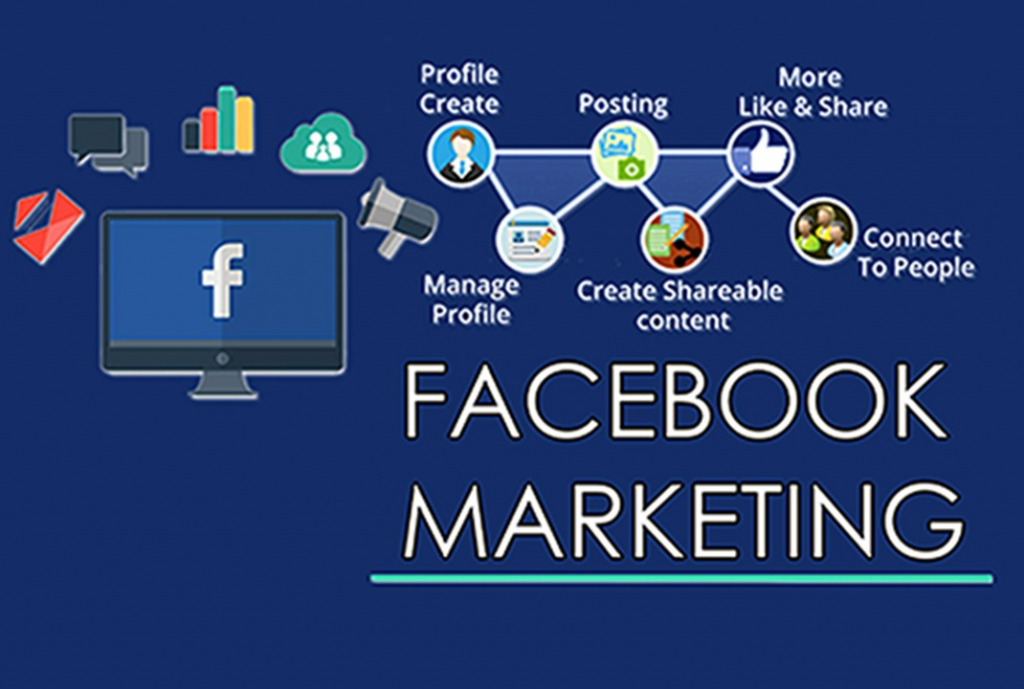
Facebook marketing includes everything from the content you share and the conversations you have in the comments, to the ads you run, the messages you reply to, and the communities you build. It’s a mix of visibility, engagement, and relationship-building, all happening on a platform people already use every day.
Unlike traditional advertising, Facebook marketing isn’t one-way. You’re not just putting a message out into the world and hoping someone notices. You’re creating opportunities for interaction—likes, comments, shares, messages, reviews, and even direct feedback. And that’s where Facebook really earns its place in a marketing strategy.
Organic vs. Paid Facebook Marketing
Facebook marketing generally falls into two categories: organic and paid.
Organic Facebook marketing refers to everything you do without spending money on ads. This includes:
- Posts on your Facebook Page
- Stories and Reels
- Comments and replies
- Community engagement
- Content shared in groups
Organic efforts help your brand feel familiar and approachable—two factors that influence engagement and buying decisions over time to people who already follow you.
Paid Facebook marketing, on the other hand, involves running ads through Meta’s advertising platform. These ads allow you to reach people who may have never heard of your business before—or re-engage people who already have. Paid campaigns are especially useful for promoting products, generating leads, driving traffic, or scaling results quickly.
Most successful brands don’t choose one or the other. They use both together, with organic content building credibility and paid ads extending reach.
More Than Just Promotion
One of the biggest misconceptions about Facebook marketing is that it’s only about promotion. In reality, constant self-promotion rarely works on Facebook.
Effective Facebook marketing is about:
- Sharing useful or interesting content
- Starting conversations
- Answering questions
- Listening to feedback
- Showing the human side of your business
When people feel like a brand is helpful and approachable, they’re far more likely to engage—and eventually buy.
Where Facebook Fits in the Customer Journey?
Facebook often plays a role long before someone makes a purchase.
A person might:
- See a post shared by a friend
- Watch a short video from a brand they don’t know yet
- Read comments or reviews on a business page
- Save a post for later
- Click an ad days or weeks after first seeing it
All of these small interactions add up. Facebook helps businesses stay visible during the moments when people are researching, comparing, and deciding.
Who Can Use Facebook Marketing?
One of the reasons Facebook marketing works so well is its flexibility. It can be used by:
- Small and local businesses
- Ecommerce brands
- Service providers
- B2B companies
- Startups and established brands
Whether your goal is to bring people into a local store, book consultations, or sell products online, Facebook can support it when used strategically.
Why Facebook Marketing Is Still Relevant
With new platforms constantly popping up, it’s fair to wonder whether Facebook is still worth the effort. The short answer is yes—but only if it’s used thoughtfully. While keeping an eye on broader social media trends to watch out for, Facebook continues to offer a massive, diverse audience that newer apps simply can't match.
Facebook continues to offer:
- A massive and diverse audience
- Detailed targeting options
- Multiple content formats
- Strong advertising tools
- Direct communication with customers
Instead of being “just another social network,” Facebook functions more like a digital hub where discovery, conversation, and conversion happen in one place.
Key Components of Facebook Marketing
Facebook marketing isn’t one single activity. It’s made up of several moving parts that work best when they support each other. You don’t need to use every feature Facebook offers, but understanding the core components helps you build a stronger, more balanced strategy.
You don’t need to use every Facebook feature to succeed. But understanding the core pieces helps you choose what actually matters for your business.
Let’s break them down one by one.
1. Facebook Business Pages
Your Facebook Business Page is the foundation of your presence on the platform. Think of it as your brand’s home base on Facebook. Many owners often debate the merits of a Facebook page vs website for small business, but in 2026, the most successful brands treat their page as a living extension of their digital storefront.
A well-set-up page does more than just display your logo and contact information. It helps people:
- Learn who you are
- Understand what you offer
- Decide whether they trust your business
At a minimum, your page should include:
- A clear profile picture and cover image
- An accurate business description
- Contact details and location (if relevant)
- A call-to-action button (like “Contact Us” or “Shop Now”)
Beyond setup, your page becomes a place where people can explore your content, read reviews, and see how you interact with your audience. How you show up here shapes first impressions.
2. Content: The Heart of Facebook Marketing
Content is what keeps your page alive. Without it, even the best-looking page won’t go far.
On Facebook, content works best when it feels useful, relatable, or interesting. This might include:
- Educational tips or insights
- Short videos explaining a concept
- Behind-the-scenes moments
- Customer stories or testimonials
- Updates about your business
The goal isn’t to sell with every post. It’s to stay relevant in your audience’s feed and give them a reason to pay attention.
A good rule of thumb is balance. Mix informative posts with lighter, more conversational content. When people feel like they’re learning or connecting—not being sold to—they’re more likely to engage.
3. Visual Content and Video
Facebook is a highly visual platform. Posts with images or videos generally perform better than text-only updates.
Video, in particular, plays a big role in Facebook marketing. Short videos, live streams, and Reels allow businesses to:
- Explain ideas quickly
- Show personality
- Capture attention while people scroll
You don’t need professional production to succeed. Clear, authentic videos often perform better than highly polished ones because they feel more real.
4. Facebook Reels and Stories
Reels and Stories are designed for quick, casual consumption. They’re ideal for:
- Sharing bite-sized tips
- Highlighting moments from daily operations
- Showing quick product demos
- Offering behind-the-scenes content
These formats help businesses stay visible without needing long-form content every time. They also tend to reach new audiences more easily than traditional posts.
5. Facebook Groups
Groups add a community element to Facebook marketing.
Some businesses use groups to:
- Provide customer support
- Share exclusive updates or resources
- Create discussion spaces around a topic or industry
Groups feel more personal than pages. They encourage conversation rather than broadcasting, which makes them a powerful tool for building loyalty and trust.
6. Facebook Ads
Facebook ads give you control over who sees your content.
With ads, you can:
- Reach people based on interests, location, or behavior
- Retarget users who visited your website or engaged with your page
- Promote specific offers or content
Ads work best when they feel like a natural extension of your organic content. Clear messaging, simple visuals, and a focused goal often outperform overly complex campaigns.
7. Messenger and Direct Communication
Facebook Messenger plays an important role in customer experience.
Many people prefer messaging a business instead of calling or emailing. Messenger allows you to:
- Answer questions quickly
- Share details or links
- Build trust through direct interaction
Timely responses can make a big difference in how people perceive your brand.
8. Insights and Analytics
Facebook provides built-in analytics that show how your content and ads are performing. These insights help you understand:
- What content resonates
- When your audience is most active
- Which posts drive engagement or clicks
Instead of guessing, you can use this data to make informed decisions and refine your strategy over time.
How to Set Up Facebook for Business?
This setup might look technical at first, but it’s mostly a one-time process—and you don’t need to get everything perfect on day one.
Create a Facebook Page for Your Business
To create a business Page, you’ll need to use your personal Facebook account. Don’t worry—your personal profile won’t be visible to the public. Facebook simply uses it to manage Pages securely.
Here’s how to do it:
- Log in to Facebook.
- Click the menu icon (the grid of dots) at the top right corner of the screen, next to your profile photo.
- Select Pages from the menu.
Click Create a new Page.
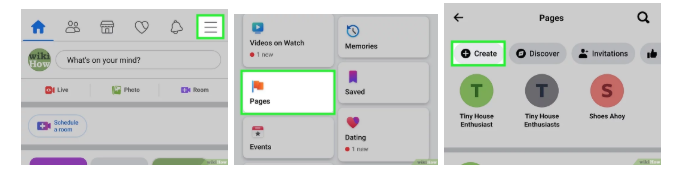
You’ll now be asked to fill in a few basic details:
- Page name: Use your business or brand name.
- Category: Choose the category that best describes your business.
Description: Write a short summary of what you do. Keep it clear and simple.
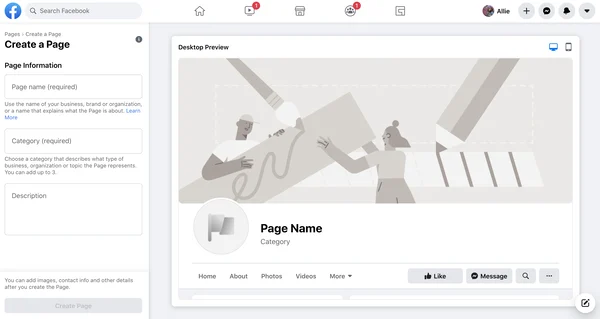
As you enter this information, Facebook will show you a preview of your Page on the right side. Once everything looks good, click Create Page.
That’s it—your Facebook Page is now live.
Optimizing Your Page (Profile, Cover, Bio, and CTA)
Creating a page is just the beginning. Optimization is what makes it effective.
Your profile picture should be instantly recognizable. Most businesses use their logo here so it stays consistent across platforms.
Your cover photo gives you more creative space. You can use it to:
- Highlight what your business offers
- Promote a product or service
- Reinforce your brand message
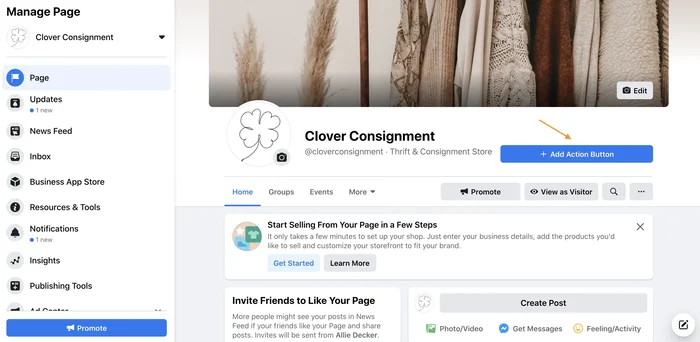
Your bio or “About” section should clearly explain who you are, what you do, and who you help—in plain language. This isn’t the place for jargon. Write it as if you’re explaining your business to someone for the first time.
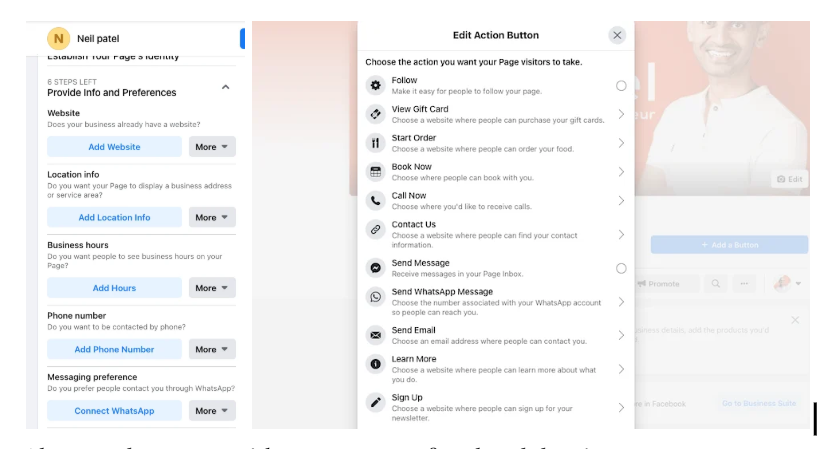
The call-to-action (CTA) button is often overlooked, but it’s important. Facebook allows you to add buttons like “Contact Us,” “Shop Now,” or “Learn More.” Choose the option that aligns with your primary goal, whether that’s driving traffic, collecting leads, or encouraging messages.
Together, these elements help visitors quickly understand your business and take the next step.
Verify Your Facebook Page (Optional)
Page verification is optional, but it can add an extra layer of credibility—especially for public figures, well-known brands, or businesses that want to prevent impersonation.
A verified Facebook Page displays a blue checkmark next to the Page name. This signals to users that Facebook has confirmed the Page belongs to a legitimate business or individual.
To qualify for verification, Facebook generally looks for:
- Authenticity (a real business or brand)
- Completeness (a fully filled-out Page)
Public presence (some level of recognition or search interest)
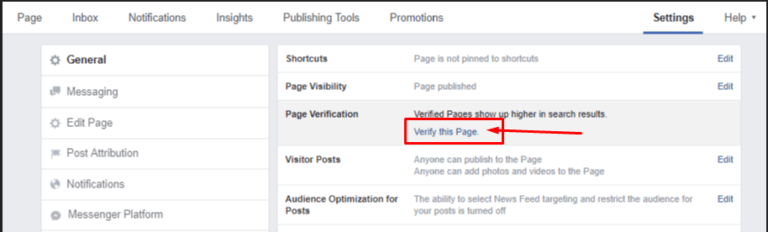
If your business doesn’t meet verification criteria, that’s completely fine. Many successful Pages operate without a blue check.
There’s also another option available now: Meta Verified. This is a paid subscription that allows businesses and creators to receive a verification badge without needing widespread public recognition. In addition to the checkmark, it includes impersonation protection and access to Meta support.
Verification won’t directly boost reach or performance—but it can help build trust with your audience.
Setting Up Meta Business Manager
Meta Business Manager is where Facebook marketing becomes more organized—especially as your business grows.
Business Manager allows you to:
- Manage your Facebook Page
- Control ad accounts
- Assign roles to team members
- Keep business assets separate from personal profiles
Setting this up early helps avoid confusion later, especially if you work with agencies, freelancers, or multiple team members.
Once your Business Manager is created, you can connect your Facebook Page and prepare your account for advertising and analytics.
Create a Facebook Ads Account
Even if you don’t plan to run Facebook ads right away, it’s smart to set up your Facebook Ads account early. That way, everything is ready when you decide to start advertising.
To create your ads account:
- Log in to Facebook using the profile that has admin access to your Facebook Page.
- Go to Meta Ads Manager.
- Follow the prompts to add your business details and billing information.
Alternatively, you can set this up through Meta Business Suite:
- Click Settings (the gear icon)
- Go to Billing and payments
- Review your ad account details and add a payment method if needed
Facebook will notify you if any information is missing. Once everything is complete and accurate, your ad account is ready to use.
Setting this up in advance helps avoid delays when you’re ready to launch your first campaign.
Types of Facebook Posts to Use in Your Strategy
It’s easy to get caught up in Page setup, algorithms, and ad formats, but at the heart of any successful Facebook marketing strategy is content. The way your brand shows up in someone’s feed plays a major role in how they perceive you—and whether they engage, follow, or scroll past.
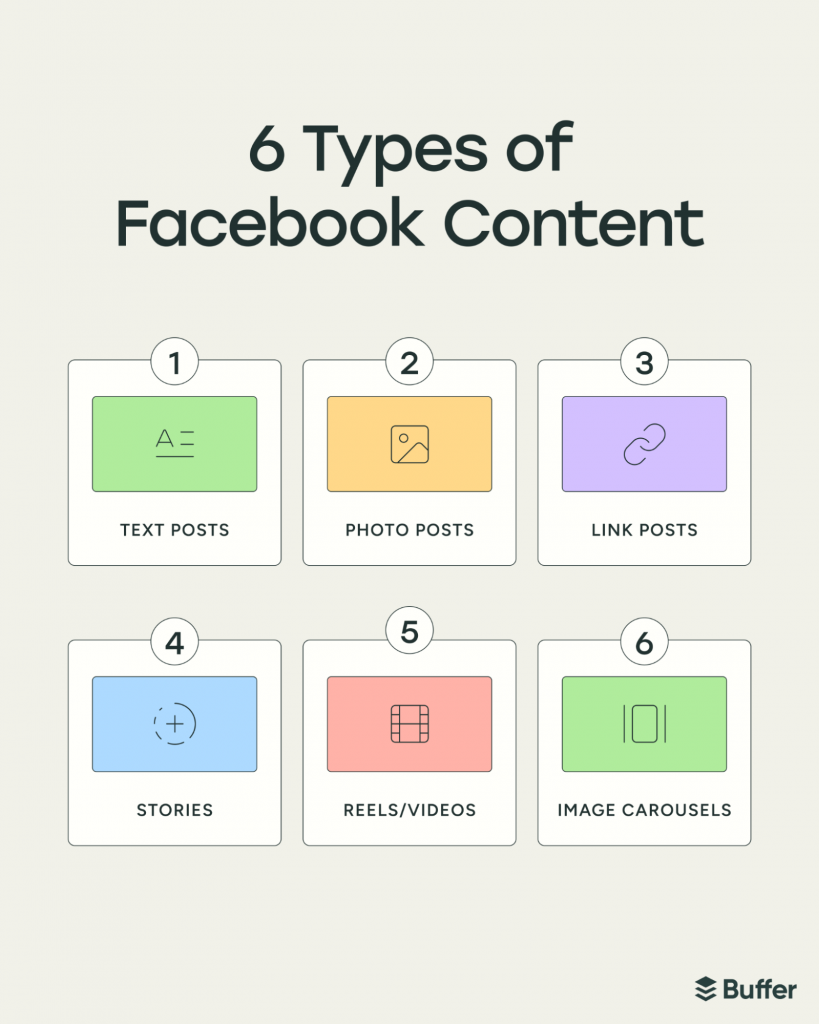
Many marketers underestimate Facebook’s impact because they treat it as a one-format platform. In reality, Facebook supports a wide mix of content types, each designed to capture attention in different ways. The goal isn’t to post everything all the time, but to create a dynamic, balanced feed that keeps your audience engaged without feeling repetitive.
Here are the main Facebook post formats you should include in your strategy—and how to use each one effectively.
Text Posts
Text-based posts are exactly what they sound like: written content without images, videos, or links. While they may seem simple, they can be surprisingly effective when used intentionally.
Text posts work well for:
- Asking questions
- Sharing quick updates or announcements
- Starting conversations
- Offering short insights or opinions
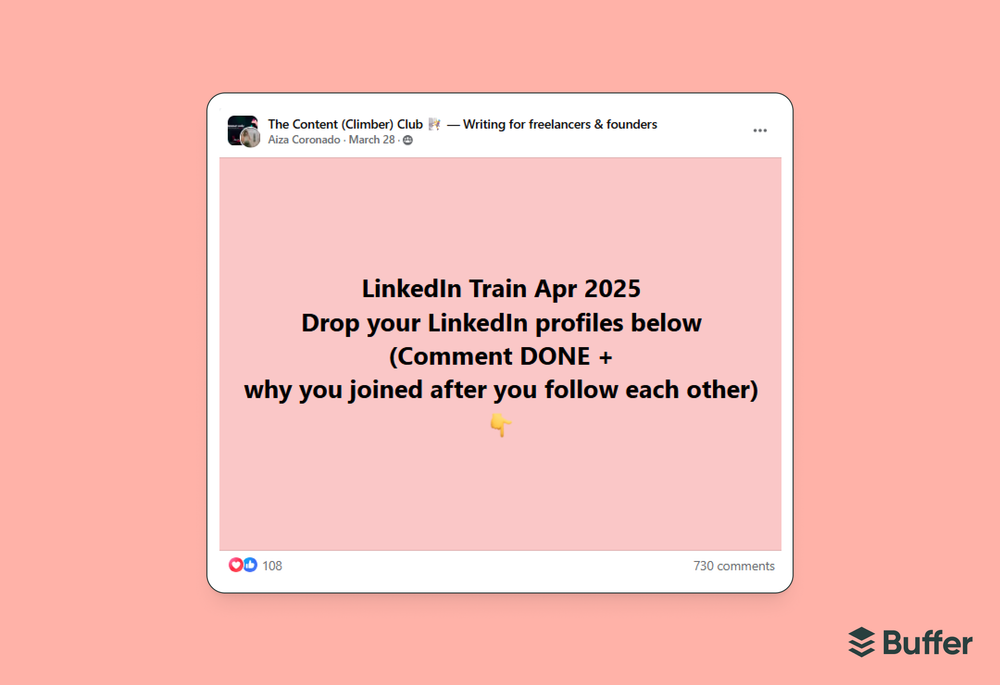
Many marketers have noticed that text-only posts often receive solid engagement because they keep users on the platform instead of sending them elsewhere. Facebook tends to favor content that encourages interaction, and a well-phrased question or thought-provoking statement can spark comments quickly.
Examples of effective text posts include:
- “What’s the biggest challenge you’re facing in your business right now?”
- “We’re working on something new—stay tuned.”
- “One thing no one tells you about growing a brand…”
The key is authenticity. Text posts should sound like human speaking, not brand broadcasting.
Image Posts
Image posts are static photos that visually represent your brand, products, or people behind the scenes. These are some of the most familiar and widely used Facebook post types.
You can use image posts to:
- Highlight products or services
- Share customer photos or user-generated content (UGC)
- Show behind-the-scenes moments
- Promote events, updates, or milestones
- Share simple graphics with quotes or tips
Strong image posts don’t need to be overly polished. In fact, real, relatable images often perform better than heavily edited ones. Photos of people, workplaces, or real-life moments help humanize your brand and make it feel approachable.
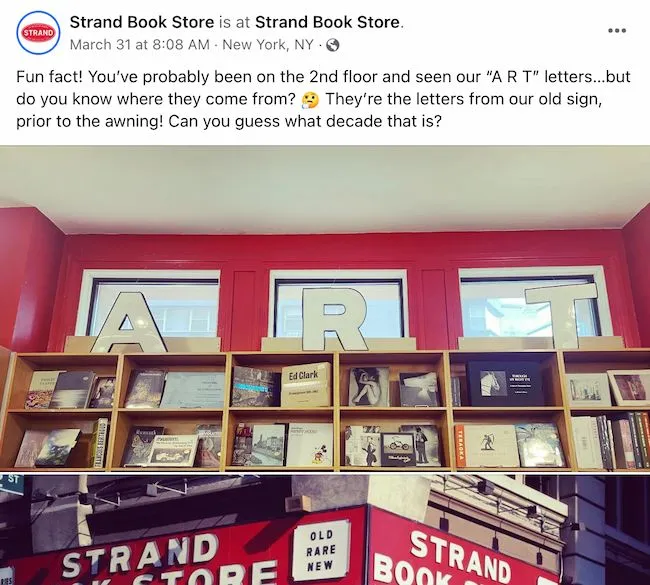
Make sure your images:
- Are clear and high quality
- Match your brand style
- Include minimal text, if any
Video Posts
Video content continues to be one of the most powerful formats on Facebook. These videos can be short or long and are typically more structured than Reels.
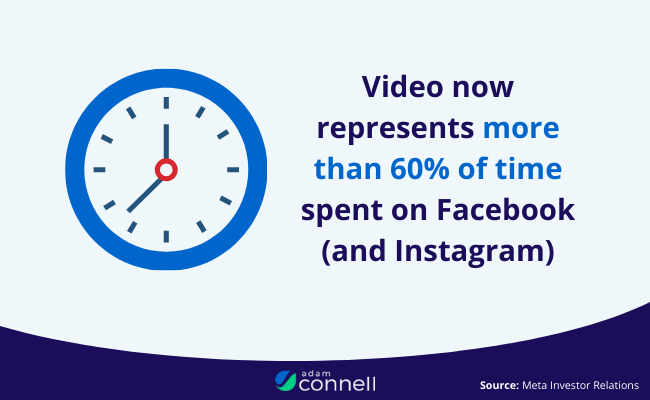
Video posts are great for:
- Product demonstrations
- Interviews or conversations
- Educational content
- Tutorials or how-to videos
- Seasonal or campaign-based messaging

Unlike Reels, Facebook video posts are often horizontal and longer in length. This format works well when you want to explain something in more detail or tell a story.
Tips for effective Facebook videos:
- Capture attention in the first few seconds
- Use captions (many people watch without sound)
- Keep the content clear and focused
- Avoid overly promotional messaging
Even simple videos recorded on a phone can perform well if the content is helpful or interesting.
Stories
Facebook Stories are short, temporary pieces of content that disappear after 24 hours. They can be photos or videos and appear at the top of the Facebook feed, making them highly visible.
Stories are ideal for:
- Quick updates
- Announcements
- Behind-the-scenes content
- Polls, questions, or interactive stickers
- Promoting new posts or offers
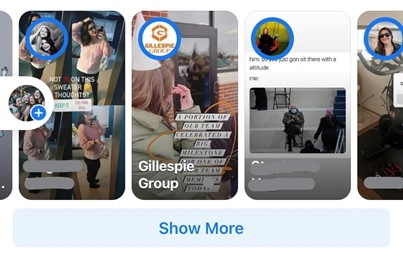
One of the biggest advantages of Stories is that they’re not as heavily affected by the feed algorithm. This makes them a great way to stay top of mind without overwhelming your audience.
Stories don’t need to be perfect. In fact, casual, in-the-moment content often works best here. Think of Stories as a way to share what’s happening right now, not a place for highly produced content.
Reels
Facebook Reels are short-form, vertical videos designed to grab attention quickly. They closely resemble the content style found on Instagram Reels and TikTok.
Reels are especially effective for:
- Increasing reach
- Reaching new audiences
- Showcasing personality and creativity
- Sharing quick tips or highlights
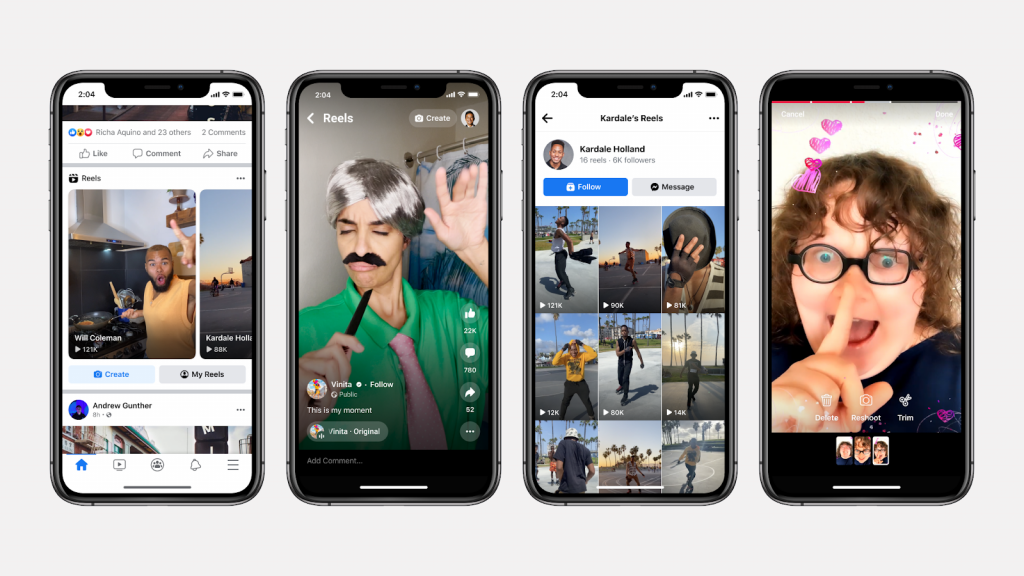
Because Reels are pushed to users beyond your existing followers, they’re a powerful discovery tool. Many brands use bold captions, engaging thumbnails, and strong opening moments to stop the scroll.
To make your Reels more effective:
- Hook viewers in the first 2–3 seconds
- Keep videos short and engaging
- Use captions and on-screen text
- Focus on storytelling or value, not hard selling
Even simple ideas—like quick tips, reactions, or before-and-after clips—can perform well when executed thoughtfully.
Image Carousels
Image carousels allow you to share multiple images in a single post, making them ideal for storytelling, showcasing collections, or guiding your audience through a process step by step. Because they encourage people to swipe, carousels often increase engagement and time spent on your content.
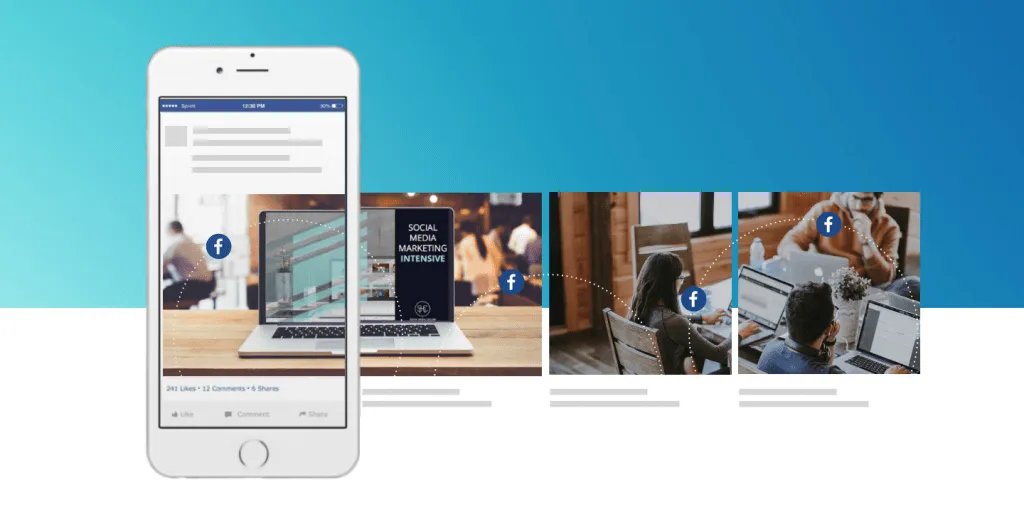
Carousels work especially well for:
- Tutorials and how-to guides
- Highlighting product features
- Before-and-after comparisons
- Any content that benefits from a clear visual sequence
Finding the Right Mix
A strong Facebook content strategy doesn’t rely on just one post type. Instead, it uses a mix of formats to keep the feed fresh and engaging.
- Text posts start conversations.
- Images build brand identity.
- Videos tell deeper stories.
- Stories keep you visible daily.
- Reels help you grow reach.
By rotating these formats and paying attention to what your audience responds to most, you can build a content strategy that feels natural, balanced, and effective.
Next, we’ll walk through how to turn these post types into a complete Facebook marketing strategy—step by step.
How to Create a Facebook Marketing Strategy: 8 Easy Steps
Every Facebook marketing guide starts with goal-setting—and yes, it sounds boring. But here’s the truth: your Facebook marketing efforts will never be successful if you don’t define what success actually looks like.
Facebook can do a lot for a business. It can build awareness, generate sales, create community, support customer service, and even help with hiring. The mistake many brands make is trying to do everything at once without a clear strategy.
These eight steps will help you build a Facebook marketing strategy that’s intentional, flexible, and aligned with your business goals.
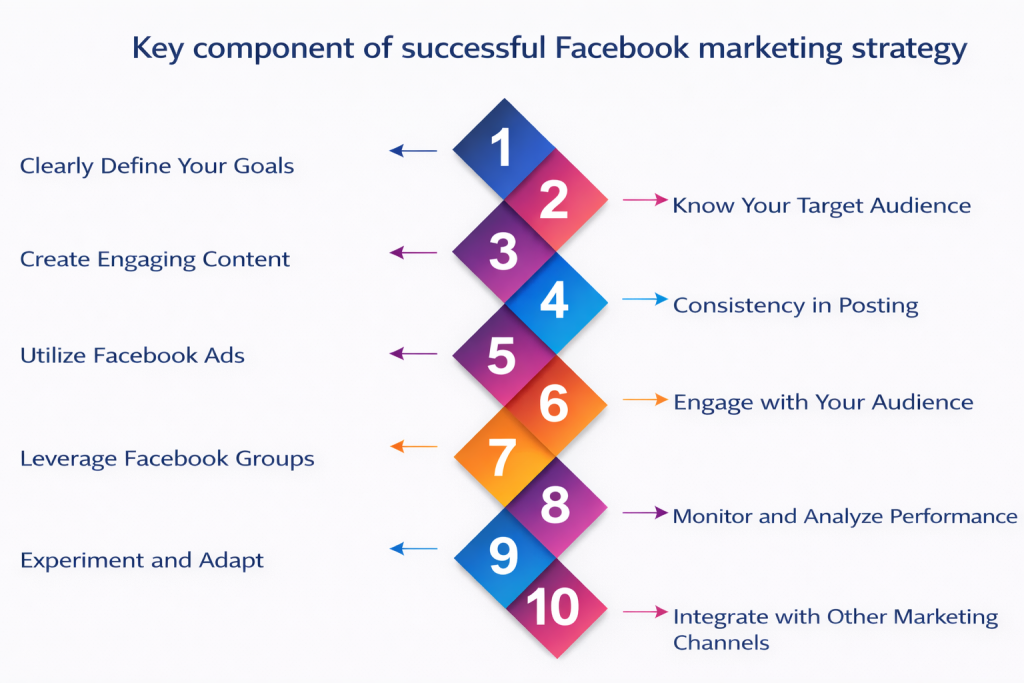
1. Define Your Facebook Marketing Goals
Before you post a single update or boost a post, you need to answer one simple question:
Why are you using Facebook for your business?
Your goal shapes everything—your content, your ad strategy, your budget, and how you measure success.
Common Facebook marketing goals include:
- Building brand awareness
Facebook is one of the best platforms for staying visible. Many people follow brands to discover new products, services, and updates. A strong presence helps keep your brand top-of-mind. - Growing an engaged audience
Not just more followers, but the right followers—people who actually interact with your content and care about what you offer. - Driving sales (online or offline)
Facebook can support e-commerce, local stores, and service-based businesses by guiding people from discovery to conversion. - Generating B2B leads
With detailed targeting, Facebook works surprisingly well for lead generation, especially when paired with educational content. - Building community and gathering feedback
Facebook is one of the few platforms where customers expect two-way communication.
There’s no wrong goal. Just make sure your Facebook objectives connect directly to your broader business goals. Otherwise, it’s easy to post content that looks busy but doesn’t move the needle.
2. Define and Understand Your Audience
Your Facebook content should never be about what you want to post. It should be about what your audience wants to see.
Before building your content strategy, get clear on who you’re trying to reach.
At a minimum, define your audience by answering:
- What age range do they fall into?
- Where do they live?
- What industries, jobs, or responsibilities do they have? (Especially important for B2B brands.)
- What problem do they face related to your product or industry?
- How and when do they use Facebook? During work hours? Evenings? Late-night scrolling?
If you already have a Facebook Page, you don’t have to guess. Use Audience Insights inside Meta Business Suite to review:
- Demographics
- Locations
- Engagement behavior
- Device usage
Compare this data to the audience you want to attract.
If it aligns—great. If not, adjust your content and messaging and monitor how your audience shifts over time.
This same data becomes incredibly valuable later if you decide to run Facebook ads.
3. Create a Facebook Content Strategy (Not Just a Posting Plan)
Your Facebook content strategy should answer one question:
Why are you posting this?
A strategy gives intention to your content. Without it, posting becomes random, inconsistent, and hard to measure.
Start by aligning your content with:
- Your brand’s visual identity (colors, style, graphics)
- Your tone of voice and personality
- Your audience’s preferences and expectations
Decide early:
- Will your content be educational, entertaining, or conversational?
- Will you share behind-the-scenes moments?
- Will you include humor or keep things strictly professional?
Then organize your content into content buckets—repeating themes that guide what you post.
Examples of content buckets:
- Industry news and insights
- Company updates
- Tips or tutorials (e.g., “Tuesday Tips”)
- Customer reviews and testimonials
- Product launches or promotions
- FAQs or myth-busting posts
To keep things balanced, many marketers follow simple content frameworks like:
- The rule of thirds: one-third brand stories, one-third engagement, one-third promotion
- The 80/20 rule: 80% value-driven content, 20% promotional
Also, think about where and how your content will appear:
- Facebook Page posts
- Reels
- Stories
- Groups
- Live videos
- Events
Variety keeps both your audience—and the algorithm—interested.
4. Post at the Right Times
Even the best content can flop if it’s posted when your audience isn’t online.
Facebook Insights can help identify:
- Days with higher engagement
- Time windows when followers are most active
General studies suggest mornings midweek perform well, but that’s only a starting point. Your audience may behave very differently.
Test different posting times, review performance, and adjust accordingly. Over time, patterns will emerge that help you post when it matters most.
5. Establish Your Facebook Marketing Budget
Facebook marketing doesn’t have to be expensive—but it does need to be intentional.
Your budget may include:
- Boosted posts
- Facebook ads
- Influencer collaborations
- Creative tools or subscriptions
Decide upfront:
- How much you can spend monthly
- What goals your budget supports (awareness, leads, sales)
- How success will be measured
Start small if needed. Test, learn, and scale what works. Facebook rewards optimization over time more than big one-off spends.
6. Engage With Your Audience (Yes, Consistently)
Because Facebook rewards interaction, consistent engagement—replying to comments, answering messages, and acknowledging feedback—plays a direct role in visibility and trust.
Engagement should be built into your strategy:
- Reply to comments
- Respond to messages
- Acknowledge feedback
- Moderate spam
This doesn’t just build relationships—it also improves visibility. Facebook prioritizes content that sparks conversation.
If managing engagement feels overwhelming, use inbox tools to centralize conversations and ensure nothing gets missed.
7. Scale Your Strategy With Tools and Automation
As your Facebook presence grows, tools become essential.
Messenger chatbots can:
- Answer common questions
- Route inquiries
- Provide instant responses 24/7
Facebook Groups help:
- Build deeper relationships
- Bypass algorithm limitations
- Gather feedback and ideas directly from your audience
Content and AI tools can:
- Speed up content creation
- Repurpose high-performing posts
- Maintain consistency during busy periods
Used correctly, tools don’t replace human connection—they support it.
8. Regularly Audit and Optimize Performance
Your Facebook marketing strategy should never be “set and forget.”
Regularly review:
- Reach and impressions
- Engagement rates
- Clicks and conversions
- Audience growth trends
Beyond analytics, perform deeper audits by:
- Reviewing branding consistency
- Identifying top-performing content types
- Comparing Facebook performance to other platforms
Use what you learn to refine your content, posting schedule, and ad strategy. The strongest Facebook strategies evolve alongside audience behavior and platform changes.
When to Start Using Facebook Ads?
Facebook ads can be incredibly powerful—but starting them too early, or for the wrong reasons, often leads to wasted money and frustration. Before you jump into paid campaigns, it’s important to know when ads actually make sense for your business.
Signs Your Business Is Ready for Facebook Ads
Not every business needs Facebook ads right away. Here are a few strong indicators that you are ready:
- You have a clear offer (product, service, lead magnet, or event)
- Your Facebook Page is active and looks credible
- You already know who your audience is
- You’ve posted organically and understand what content resonates
- Your website or landing page is ready to convert visitors
If you’re still figuring out what you sell, who you serve, or how your offer works, ads will only amplify that confusion. Ads don’t fix unclear messaging—they expose it.
Think of Facebook ads as a megaphone, not a magic wand.
Organic vs. Paid: When Ads Make Sense
Organic and paid Facebook marketing serve different roles. Organic content builds credibility and relationships over time, while ads help you extend reach and accelerate results when needed.
Ads make sense when:
- You want faster results than organic can provide
- You’re launching a new product or promotion
- You want to retarget people who’ve already interacted with you
- You need a predictable lead flow or sales
Once you’ve built a strong organic foundation, paid ads help scale what’s already working.
The best strategies use both together:
- Organic content warms people up
- Ads push them to take action
Types of Facebook Ad Objectives (What You Can Actually Run Ads For)
Facebook doesn’t just say “run an ad.” It asks what you want to achieve. These are called objectives, and choosing the wrong one is one of the most common beginner mistakes.
Some of the most common objectives include:
- Awareness: Reach new people and increase brand visibility
- Engagement: Get likes, comments, shares, or video views
- Traffic: Send people to your website or landing page
- Leads: Collect emails, inquiries, or form submissions
- Sales/Conversions: Drive purchases or bookings
- Messages: Get people to start a conversation in Messenger or WhatsApp
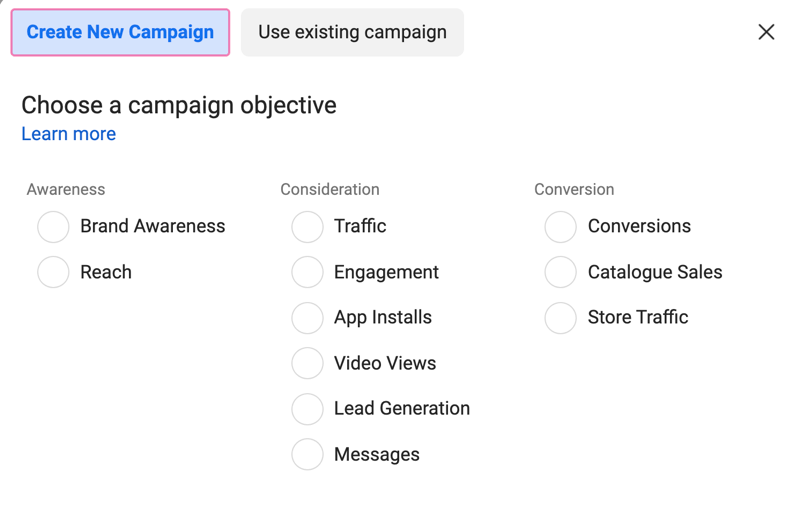
If you’re just starting out, engagement or traffic campaigns are often a safer way to test ads before jumping straight into sales.
Budgeting Tips for Beginners
You don’t need a massive budget to start advertising on Facebook—but you do need realistic expectations.
Some beginner-friendly tips:
- Start small: even $5–$10 per day can give useful data
- Run one campaign at a time
- Test one variable (creative, audience, or copy), not everything at once
- Give ads time—don’t judge results in 24 hours
Think of your first few campaigns as learning experiments, not profit machines.
Common Facebook Ad Mistakes to Avoid
Many businesses fail with Facebook ads not because ads don’t work—but because of avoidable errors:
- Boosting random posts without a strategy
- Targeting everyone instead of a specific audience
- Sending traffic to slow or confusing landing pages
- Changing ads too frequently
- Ignoring comments and messages on ads
Facebook ads reward clarity and consistency. The more focused your message, the better your results.