
WordPress deserves a place on the shortlist when your website needs flexible product content, technical resources, and quotation forms, provided someone owns its maintenance. Shopify deserves closer attention when customers need to place and manage orders online. Webflow can suit a marketing website with structured content and a team comfortable with its visual design tools.
For a manufacturer or B2B supplier, the decision depends on how buyers evaluate your capabilities and how your team maintains the information. A platform that publishes attractive pages may still need substantial work to support product filters, document revisions, or an RFQ that reaches the right salesperson.
This comparison assesses WordPress and six alternatives against those practical requirements.
Understand what you are comparing
A content management system, or CMS, stores and publishes website content. Hosted website builders and commerce platforms also provide CMS functions, but their hosting, customization, and maintenance arrangements differ.
Here, WordPress means the software available through WordPress.org, installed with a hosting provider. WordPress.com is a managed hosting service using that software; its features depend on the plan. The official WordPress.com and WordPress.org comparison explains this distinction. Our introduction to how WordPress works covers the basic publishing process.
WordPress and other CMS platforms at a glance
Use this table to form a shortlist. It is a practical assessment of fit, not a universal ranking. Confirm the required features on the proposed plan and implementation.
Platform | Worth considering when | Main tradeoff to investigate |
|---|---|---|
WordPress | Content, capability pages, and custom inquiry journeys drive the site. | Hosting, plugins, custom development, and maintenance need clear ownership. |
Webflow | Marketing needs visual design control and reusable content templates. | Validate CMS limits, filtering, integrations, and export requirements. |
Shopify | Buyers need catalogs, checkout, and repeat ordering. | Confirm B2B plan features and the fit for quotations or configured products. |
Drupal | Structured content, permissions, and editorial approvals are complex. | Allow for specialist implementation and ongoing support. |
Joomla | Multilingual publishing and access controls match the team’s requirements. | Check extension compatibility and the available maintenance team. |
Wix | A smaller team needs hosted editing for a defined website scope. | Prototype advanced catalog, document, and integration requirements. |
Squarespace | A relatively simple service or capability website meets the brief. | Validate detailed product structures and custom workflows before committing. |
Compare six requirements before choosing a CMS
Product catalogs
Start with the information behind each product. A supplier may need model numbers, dimensions, materials, operating ranges, related documents, and replacement parts. Ask whether those values live in consistent fields that can be updated and reused, rather than being copied into separate page layouts.
WordPress supports custom content types, but a structured industrial catalog requires configuration or development. WooCommerce is an option when commerce is needed; a catalog leading to quotations does not automatically require a shopping cart.
Webflow CMS Collections support structured content and relationships. Test the proposed content model against current plan limits and the actual filtering experience. Drupal also merits evaluation for more complex content relationships, especially when a capable development team is available.
Shopify is a natural candidate for products sold through checkout. For every platform, demonstrate a product import, a bulk specification update, and navigation from a product family to the correct model. Catalog size alone does not determine the winner.
Quotation forms
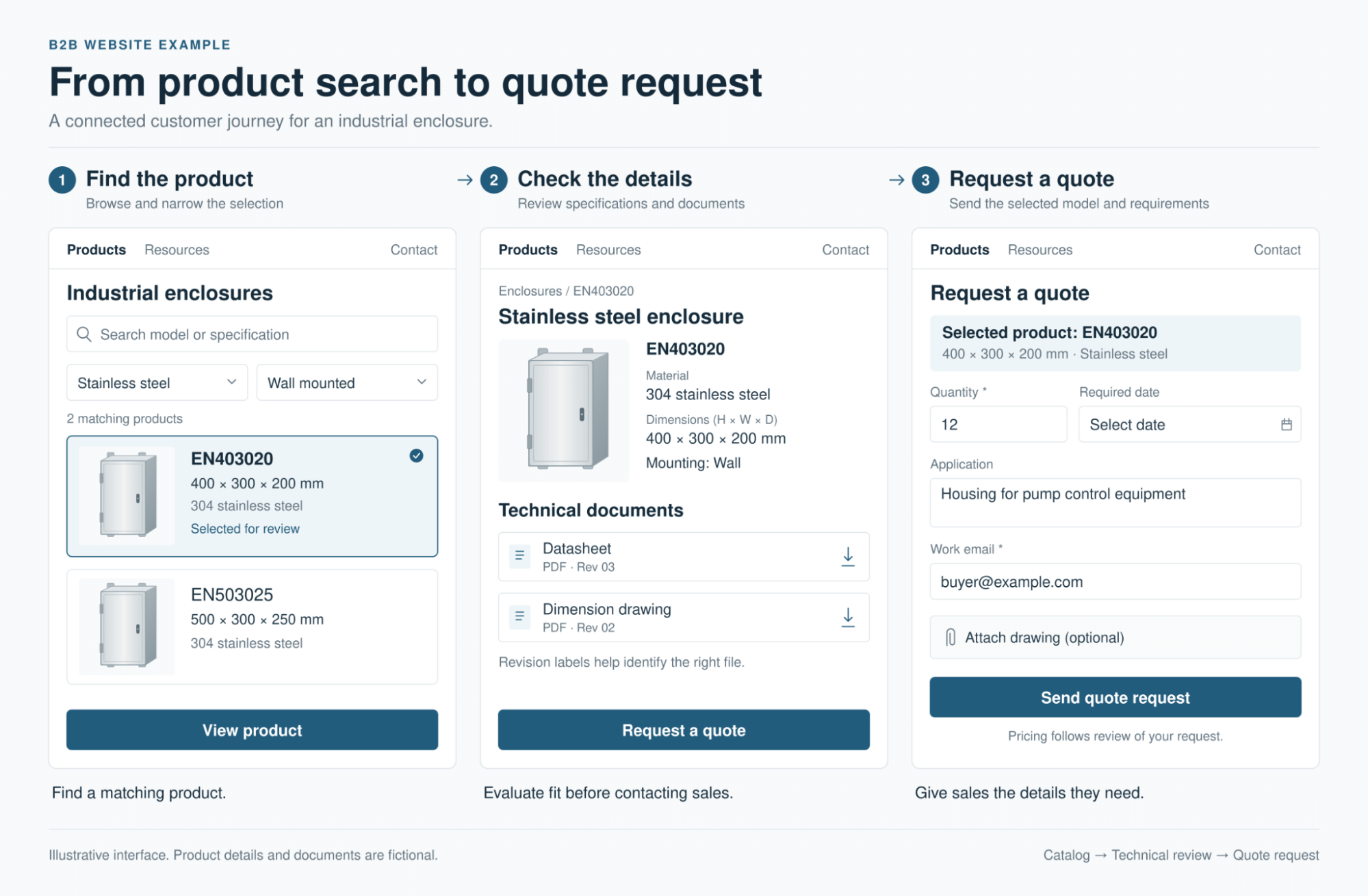
A request for quotation, or RFQ, may need a part number, quantity, application details, delivery requirements, and a drawing upload. A basic contact form does not prove that the whole process works.
In WordPress, an RFQ workflow commonly combines a forms plugin with configuration, CRM integration, or custom development. Hosted platforms can also support forms and integrations, but confirm the exact requirements rather than assuming the standard form is sufficient.
Test conditional fields, permitted file types, upload size, spam controls, and confirmation messages. Submit an inquiry and verify that the attachment and product context reach the assigned salesperson. Agree how confidential drawings are protected and who can retrieve them.
Shopify B2B includes customer specific buying features, with availability varying by plan. Demonstrate the required quote approval, account pricing, and ordering sequence before selecting it for a business that rarely sells at a published price.
Technical documents
Datasheets, drawings, certifications, and manuals need reliable associations with products. Test how an editor replaces a document, records its revision, and updates all relevant links. Confirm whether older versions remain available for customers maintaining discontinued equipment.
A media library is not automatically a document control system. Across WordPress, Webflow, Drupal, and hosted builders, the solution may involve content fields, extensions, or a separate document platform.
If engineering must approve changes before publication, evaluate Drupal’s content moderation workflows. Joomla includes multilingual publishing and access controls, which may suit teams with those requirements and established Joomla expertise. Other platforms can support approval processes too, but the exact implementation needs testing.
Keep public product information easy to access. Restrict confidential files deliberately, rather than putting every datasheet behind a lead form.
Integrations
List the systems the website must exchange information with. A CRM handles contacts and sales activity. An ERP may hold inventory, pricing, and orders. A product information management system, or PIM, may hold approved product attributes.
Then define the direction and timing of each connection. Sending an RFQ to HubSpot is a different requirement from displaying customer specific prices from an ERP.
WordPress offers plugins and development options; Webflow provides APIs and app integrations; Shopify supports commerce integrations and APIs. None of those facts proves that a connector supports your exact fields or business rules.
Ask for a demonstration using representative records. Check duplicate handling, authentication, synchronization delays, API limits, error alerts, and who fixes a failed transfer. An integration that silently stops can lose inquiries even when the website looks normal.
Ownership and portability
Separate ownership of your content from the ability to move the working website. Your company should control the domain, administrator access, analytics accounts, and the licenses or contracts it needs to operate the site.
With WordPress, you can generally move the installation to another suitable host. Portability can still be complicated by a proprietary page builder, theme, plugin, or custom integration. Our WordPress theme selection guide provides context for reviewing that part of the build.
With hosted platforms, check what exports include and what must be rebuilt elsewhere. A content export may not preserve templates, forms, redirects, customer workflows, or application behavior. Ask the vendor to explain the exit process in writing, including access to files and customer data.
Maintenance and total cost
WordPress software has no license fee, but a business website still needs hosting, implementation, backups, updates, security monitoring, and support. Some hosts or agencies manage parts of that work. Define the scope rather than assuming every update is manual or that managed hosting covers everything.
Hosted services handle more of the underlying platform infrastructure. Your team still owns content accuracy, user permissions, third party integrations, form delivery, and subscription renewals. Wix and Squarespace can be sensible choices when their supported features meet the brief and a simpler operating arrangement matters.
Compare proposals over the same period, such as three years. Include the build, migration, subscriptions, extensions, integration maintenance, training, and likely changes. Ask what an additional product family or a new RFQ requirement would cost. The cheapest subscription can become an expensive implementation.
Can your CMS support the complete buying journey?
Which CMS is best for SEO
WordPress provides extensive control, but choosing it does not guarantee stronger rankings. Wix documents customizable SEO settings, including metadata and indexing controls. Squarespace also provides built in SEO tools. Dismissing either platform as inherently unsuitable for SEO is too broad.
Evaluate the actual implementation. Can the team manage titles, indexability, canonical URLs, redirects, sitemaps, and useful internal links? Can buyers and search engines reach the product information? Can templates remain usable on mobile devices without unnecessary scripts or oversized media?
Google Search Essentials emphasizes useful content, accessible pages, and crawlable links. A CMS or plugin cannot substitute for a page that answers the buyer’s question.
Use our on page SEO guide for B2B companies and manufacturers to assess the product and capability pages built on your chosen platform.
If you are replacing an existing platform, use our website redesign SEO checklist to plan content preservation, URL mapping, and launch checks.
Test the shortlist with a real buying journey
Give two shortlisted vendors the same small pilot. For an industrial supplier, it could include a product family, three representative models, a current datasheet, a legacy manual, and an RFQ form. This is an illustrative test brief, not a client case study.
Ask each vendor to demonstrate the following:
- A buyer finds a model by its relevant technical attributes and opens the correct document.
- The buyer submits an RFQ with the model and quantity preserved in the CRM record.
- An editor updates a specification and document without breaking related pages.
- An authorized reviewer approves publication where required.
- The team restores a previous version and exports the agreed content and files.
Have the people who will maintain the site perform the editing tasks. Record what is native, what needs configuration or an extension, and what requires custom development. Treat unmet essential requirements as reasons to reject an option, even if its demo looks impressive.
For a website centered on capabilities, content, and inquiries, WordPress and Webflow are reasonable starting candidates. For repeat online ordering, include Shopify. For complex content governance, evaluate Drupal or Joomla with the team that would support them. Wix or Squarespace may be sufficient when the requirements are simpler. Let the pilot establish the fit.