
Google Search Console Rolls Out Generative AI Performance Reports

Table of Contents

TLDR

What’s new: Google has added a Generative AI Performance Report in Search Console separate from organic results, showing how your content performs inside AI Overviews.

3 new metrics: Generative Impressions · Generative Clicks · Generative CTR.

Where: Search Console → Performance → Generative AI tab.

Why it matters: AI Overviews have been generating citations with no measurable traffic data until now. This closes the visibility gap.

Google has officially launched a game-changing update for digital marketers: the Generative AI Performance Report in Google Search Console. This highly anticipated tool finally provides SEOs with direct visibility into how their content performs within Google’s AI-powered search environments, specifically targeting AI Overviews and conversational query results.

For the past couple of years, measuring the traffic impact of “zero-click” AI-generated answers was largely a guessing game. With this major update, Google is splitting standard organic search results from Generative AI search data, bringing much-needed transparency to the industry.

Read more: Google Search Central Blog

Key Metrics to Track

The new performance dashboard introduces three critical metrics to evaluate your AI search footprints:

  • Generative Impressions: The number of times your website is cited, linked, or used as a primary source inside a generative AI response.
  • Generative Clicks: Direct clicks on your source cards, inline links, and deep-dive dropdowns within the AI-generated interface.
  • Generative CTR (Click-Through Rate): The efficiency with which your cited sources convert impressions into actual referral traffic.
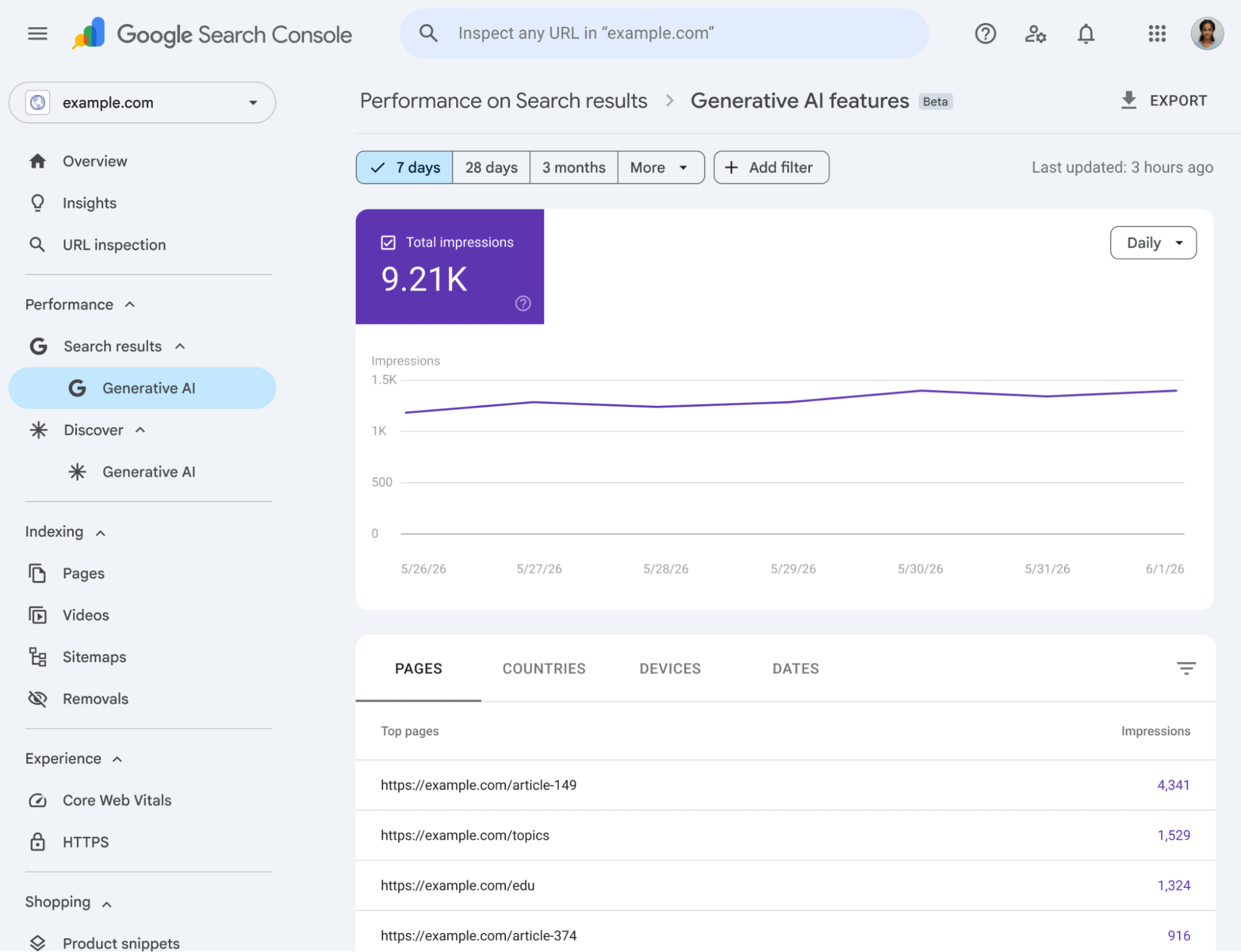
image1

Source: developers.google.com/search/blog/2026/06/gen-ai-performance-reports

Why This Is Crucial for 2026 SEO Strategies

As user search behaviours shift toward conversational models, simply ranking on the traditional “first page” is no longer the ultimate goal. Marketers must optimise for LLM (Large Language Model) extraction.

Using these reports, you can directly verify if your “AI-optimised” content structures such as bulleted TL;DR boxes, schema markups, and Q&A formats are successfully being crawled and displayed by Google’s Gemini models. It provides the concrete data SEO teams need to justify their digital transformation and search optimisation budgets to stakeholders.


Worth knowing: AI Overviews now appear in an estimated 15–20% of all Google searches in the US, with significantly higher rates in health, finance, and technology. Google confirmed at I/O 2026 that AI Mode and AI Overviews collectively serve over 2.5 billion monthly users. This report is the first tool that lets you measure your slice of that surface.

Getting Started

To access the data, navigate to your Search Console sidebar, look under the “Performance” section, and select the new “Generative AI” tab. Benchmark your current baseline metrics today to stay ahead of the curve.

First action: Export your baseline Generative Impressions, Clicks, and CTR immediately after accessing the report. This snapshot is your before-state; without it, you cannot measure the impact of any AI content optimisations you make going forward.

Frequently Asked Questions

1. What is the Generative AI Performance Report in Google Search Console?

It is a new tab inside Search Console's Performance section that tracks how your content performs inside Google's AI-generated search results, specifically AI Overviews and conversational responses. It introduces three new metrics (Generative Impressions, Generative Clicks, Generative CTR) that are completely separate from your standard organic search data.

The standard Performance report tracks clicks and impressions from traditional organic results. The new Generative AI report tracks performance inside AI Overviews, where your content may be cited as a source without ever appearing as a standalone blue link. A page can have strong Generative Impressions while showing flat traditional impressions and vice versa.

Go to Google Search Console → click 'Performance' in the left sidebar → select the 'Generative AI' tab. If you don't see it yet, the feature is still rolling out. Check back within a few days.

Based on observed AI Overview patterns, content that performs best includes: pages with clear TL;DR or summary sections, Q&A formatted content that matches conversational queries, pages with FAQPage or Article schema markup, and posts that cite primary sources and data inline. The Generative AI report now lets you verify which of these structures is actually driving your citations.

Generative CTR will typically be lower than traditional organic CTR AI Overviews are designed to resolve queries without requiring a click. Early data suggests 2–8% may represent solid performance depending on the niche. Do not benchmark against your organic CTR. Establish your own baseline first and track the trend direction over time.

Need Help Acting on Your Generative AI Data?

c3 Digitus helps businesses translate Search Console insights into clear SEO actions. If your AI impressions are flat or clicks aren’t growing, we can help diagnose and fix it.

→  c3digitus.com