

Describe capabilities in terms buyers can check
Statements such as “quality solutions” offer little help when someone is comparing suppliers. Explain what the company does, who it serves, and where its capabilities begin and end.
For a machining supplier, this could mean supported materials, available processes, part size ranges, inspection capabilities, and whether the business accepts prototypes or production work. For an electrical component supplier, the useful details might include model numbers, ratings, mounting options, and compatible accessories. Publish only specifications the technical team has verified.
Distinguish standard capabilities from requirements that need engineering review. A conditional tolerance or delivery estimate should include the condition, rather than appear as an unconditional promise across the site.
Consistency matters here. In a survey of 632 B2B buyers conducted in 2024 and reported by Gartner in June 2025, 69% reported inconsistencies between supplier website information and information provided by sellers. Review website claims alongside current sales materials, particularly capabilities, lead times, and service coverage.
Make technical information easy to compare and share
Useful industrial website design gives buyers a consistent way to examine products. Use the same field names and units across a product family, and place the relevant datasheet, drawing, or installation instructions beside the model they describe.
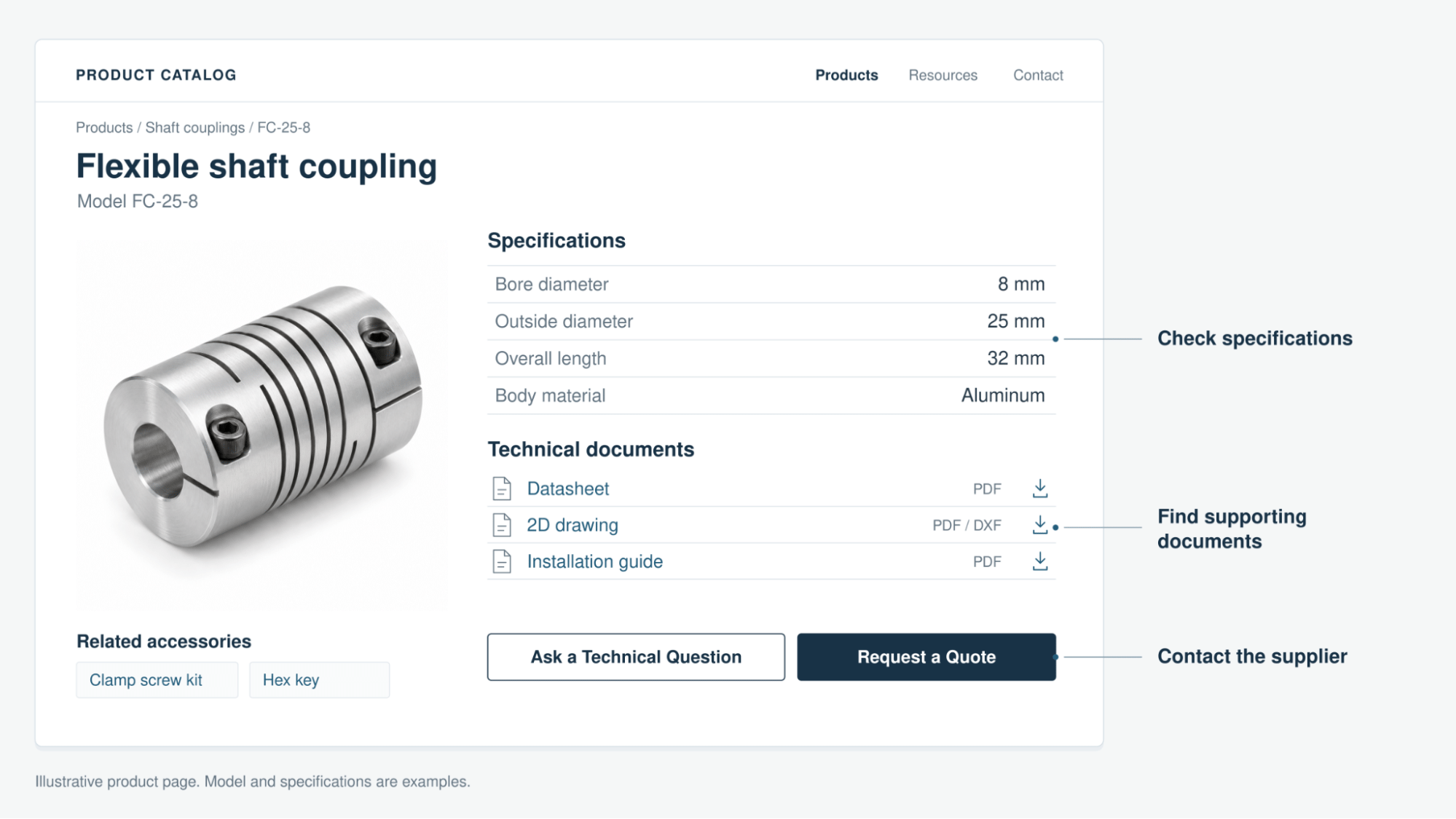
Give documents descriptive filenames, clear revision information, and an identifiable product association. If an older manual remains necessary for installed equipment, distinguish it from documentation for the current model. Include essential specifications as readable page content so buyers can evaluate the product before opening several files.
A purchasing colleague should be able to open a shared product link and understand what was selected. Keep ordinary specifications and capability information accessible without a sales form where practical. Explain the appropriate exchange process for confidential drawings or information requiring an NDA.
This also affects platform selection. Our comparison of WordPress and other CMS platforms covers how to assess catalogs, documents, quotation forms, and ongoing maintenance.
Support capability claims with relevant proof
Show evidence near the claim it supports. A process video belongs beside the relevant capability. A project example should explain the customer’s requirement, your contribution, and the outcome you can substantiate. Label illustrative examples clearly.
Keep certificates current and explain their scope. A certification applying to one facility, process, or product should not appear to cover everything the business supplies.
c3controls connects product exploration with buyer resources
The published c3controls case study describes our work with c3digitus’s sister company, an industrial electrical controls manufacturer. Its website redesign emphasized direct access to information, simpler navigation, and product exploration within an ecommerce experience. The site also developed a knowledge hub containing blogs, white papers, and other resources for buyers and engineers.
For a catalog manufacturer, the useful lesson is to connect product evaluation with supporting information and an appropriate next step. The case study covers a broader program including branding, SEO, social media, and video. Its growth results should not be attributed to website design alone.
Butler Technologies makes specialist capabilities easier to explain
Our Butler Technologies case study describes ongoing content development and technical optimization around its capabilities, applications, and expertise. Video work highlights the technology, people, and processes behind the business, with website updates forming part of the wider support.
This provides a useful example for suppliers whose work needs explanation before a buyer can assess fit. Show how the process relates to an application and give the visitor access to the relevant capability information. The published case study describes a continuing marketing partnership; it does not isolate a standalone website redesign result.
Make the inquiry route match the buying task
A buyer selecting a standard component may need a product question answered. Someone commissioning a custom assembly may need to share drawings, quantities, and operating conditions. The website should make those routes understandable.
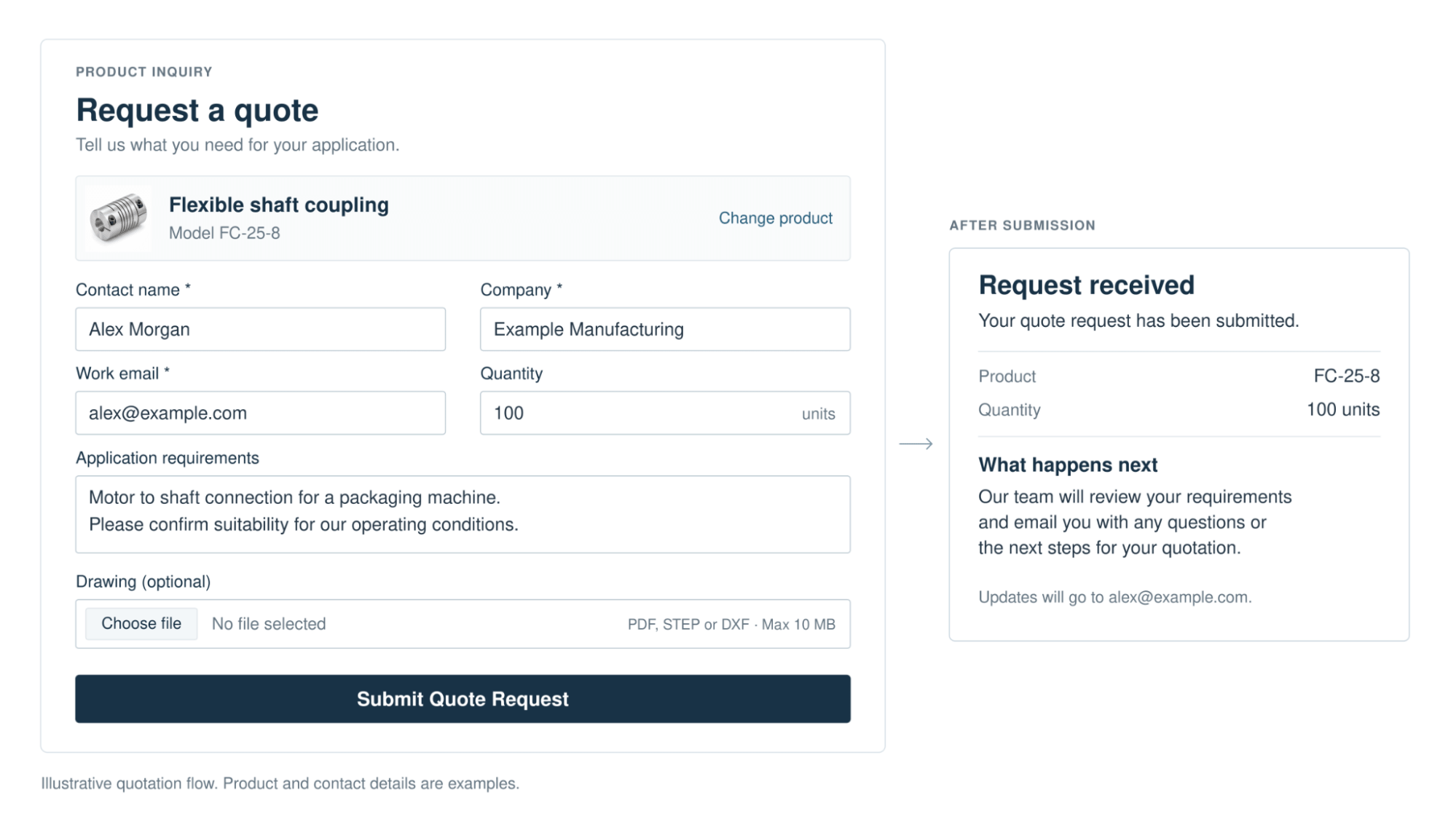
Use descriptive actions such as “Ask a Technical Question” and “Request a Quote” where they match the service available. Explain which details help the team respond. A practical quotation form can include:
- Company name, contact name, and work email.
- The selected product or a brief description of the requirement.
- Quantity or expected production volume, with an option for unknown quantities.
- Application details and a target date, where relevant.
- An optional drawing upload, with accepted file types and size limits stated.
Carry the selected product into the form when possible. Require only the information needed to handle the initial request, and provide a clear alternative when a visitor needs help defining the specification.
After submission, confirm that the request was received and explain the next step. Promise a response timeframe only if the team can meet it. Assign responsibility for incoming inquiries and verify that the message and attachments reach the intended recipient. A form button click alone does not establish that a lead was delivered.
Design the site around real buyer tasks
Buyers can land directly on a product, service, or article page. Make each page understandable on its own, with navigation to its product family, related information, and contact route.
Test those tasks on desktop and mobile. Can a visitor find a model, read its specifications, open the correct document, and complete an inquiry without losing their place? Check keyboard navigation, readable contrast, and clear form errors. The W3C guidance on form labels explains why controls need identifiable labels; placeholder text alone is not a reliable substitute.
Review loading speed, responsiveness, and unexpected layout movement using Core Web Vitals. These checks support usability, but they do not tell you whether the page answers the buyer’s question. Test both the interface and the information.
Give search visitors a useful page to land on
Create substantive pages for the products and capabilities you actually offer. Use descriptive titles and headings, explain the application, and link to relevant evidence. Give related blogs a clear route to the commercial page that helps the reader take the next step.
Google’s guidance on helpful content emphasizes information created to benefit people and demonstrate relevant knowledge. Repeating broad marketing phrases across service pages gives buyers little reason to choose your company.
Our on page SEO guide for B2B companies explains the page structure and internal linking work in more detail. Improved content still needs to be discoverable and indexable, and its publication does not guarantee rankings or inquiries.
Prioritize improvements before committing to a full redesign
Select one commercially important product or service and follow its path from entry page to inquiry. Record missing information, outdated claims, broken downloads, and form problems. Ask sales which unanswered questions prevent useful follow-up.
Fix those obstacles first. Updating a capability description, adding an approved project example, or repairing a quotation form may be possible within the existing site. A redesign becomes more relevant when the current structure, platform, or templates repeatedly prevent necessary improvements.
If a rebuild is needed, preserve valuable content, URLs, and technical resources. Use our website redesign SEO checklist to plan the migration and launch checks.
Measure whether the website supports suitable inquiries
Review relevant search clicks and visits to priority capability pages alongside successfully received inquiries. Check which requests match the products, applications, and markets you serve, and whether sales can qualify or quote them.
Keep document downloads and form starts separate from delivered inquiries. A useful review links website activity to sales outcomes where tracking and consent permit, while recognizing that not every earlier visit will be attributable.
Compare organic search and referral traffic, and identify visits from AI assistants where the source is available. If you report AI referrals separately, exclude those same visits from the general referral total to avoid double counting. Our website analytics guide provides a broader measurement framework.
Record the date and scope of each website update. Compare equivalent periods and review lead quality with sales, rather than treating every traffic change as the result of the latest edit.