
An industrial company needs a mobile app when people repeatedly lose time moving between the job, a paper form, and a business system. A technician retypes service notes after returning to the office. A distributor calls to confirm the same account information. An inspector photographs a defect but cannot attach it to the correct production record.
These are practical starting points for manufacturing mobile app development. The investment becomes easier to justify when an app removes a measurable delay, improves record accuracy, or gives customers a useful service they will return to.
An app is not automatically the right answer. Your existing maintenance platform may already have a mobile module. A responsive customer portal may cover the requirement. Before commissioning custom software, establish what users need to do, where the current process fails, and why the available alternatives fall short.
When a mobile app is worth considering
Start with the work rather than the screen design. Ask an operator, technician, distributor, or account manager to demonstrate a recent task. Note every repeated entry, phone call, search for a document, and wait for approval. Record the exceptions as carefully as the normal sequence.
An app has a stronger business case when the task occurs often, the user is away from a desk, and the information already has a reliable owner. It also needs a process owner who can make decisions after launch. A software supplier cannot settle conflicting rules about who may release an order or close an inspection.
For occasional product research, a well structured B2B website may be sufficient. Keep public specifications, capabilities, and application guidance accessible on the website. A customer app can support repeat transactions without forcing first time prospects to install software to evaluate your company.
Postpone custom development if the main problem is inconsistent master data, unclear approvals, or low use of software you already own. Those issues can follow the team into a new app.
Industrial mobile app use cases and their business value
The following are illustrative opportunities, not measured customer results. Each connects an app function to a result that operations or commercial teams can check.
Business and user | Useful mobile workflow | Measure of value |
|---|---|---|
Industrial service technicians | Receive work orders, retrieve service history, and attach job photos | Administrative minutes per job and missing documentation |
Automotive component inspectors | Record checks against the correct part, lot, and instruction revision | Incomplete records and time needed to investigate an exception |
OEM customers and distributors | Identify equipment, find compatible parts, and submit reorder requests | Order correction rate and time to submit an accurate request |
Component supplier account teams | Access approved account pricing, availability, and order status | Status calls and time spent answering routine account questions |
Warehouse and service vehicle teams | Scan stock movements and reconcile quantities | Inventory discrepancies and unrecorded movements |
Manufacturers with several plants | Use controlled inspection forms and route exceptions to site owners | Form revision consistency and exception resolution time |
Work orders and field documentation
A work order management app for manufacturing should preserve the job context: asset, location, assigned person, approved instructions, materials, and completion evidence. A technician should not have to enter the same asset number on several screens.
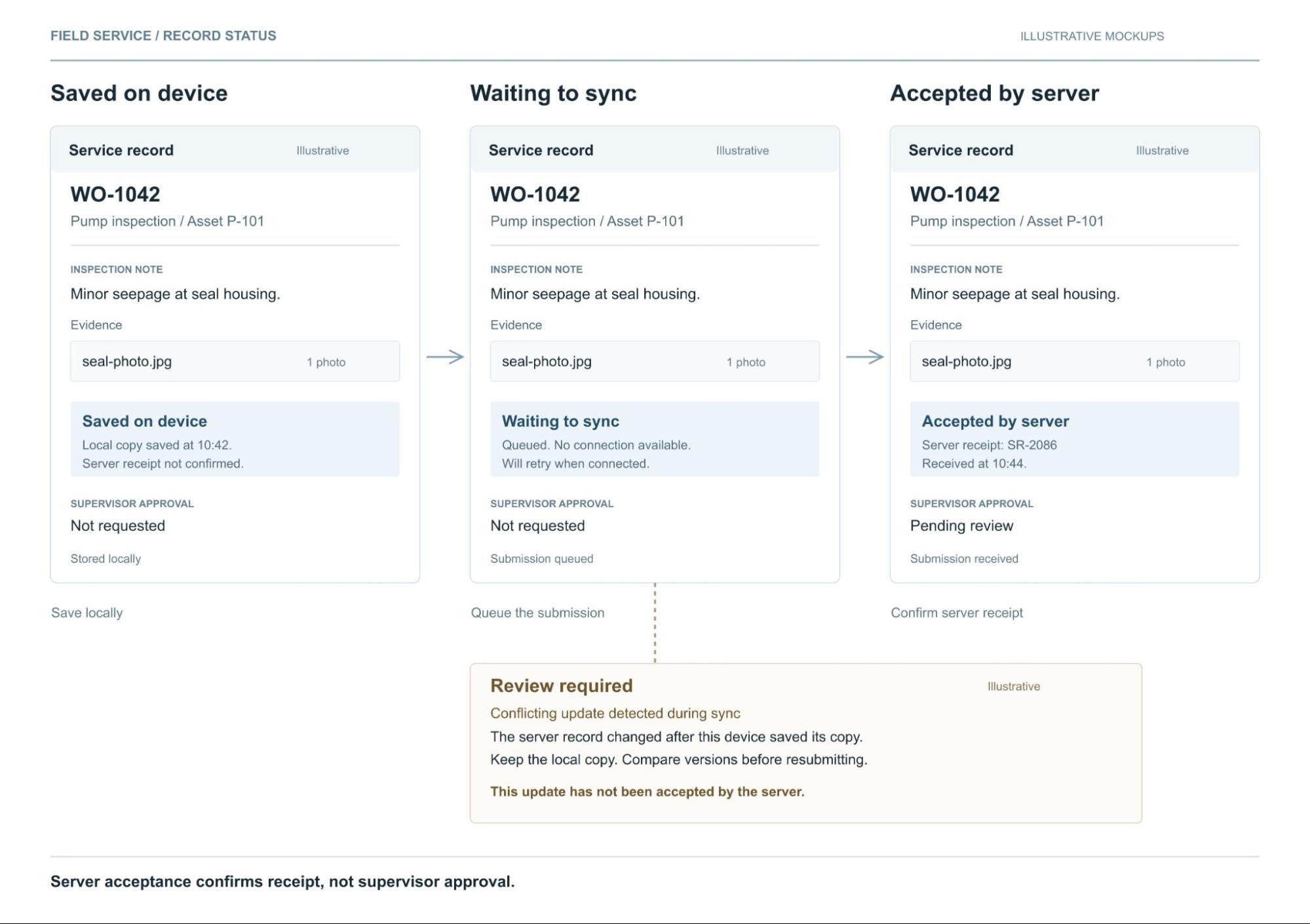
Define what “complete” means. Capturing a photograph may finish the technician’s task while leaving a supervisor approval outstanding. Separate those states so an office team does not invoice an unapproved job or assume a maintenance issue has been resolved.
OEM parts ordering
OEM parts ordering app development involves more than displaying a catalog. Buyers may need equipment serial numbers, part supersessions, account pricing, minimum order quantities, and purchasing approvals. Some requests should become quotations rather than immediate orders.
Make the distinction between stock information and a delivery commitment explicit. A cached quantity or an inventory balance does not necessarily account for allocation, credit status, or transportation. Confirm the order in the authoritative business system before displaying a committed status.
Equipment monitoring and maintenance
An Industrial Internet of Things, or IIoT, app can present equipment readings, maintenance history, and notifications. The useful question is what a person should do with that information. Assigning a maintenance review to an owner may matter more than adding another dashboard.
A threshold alert is not, by itself, predictive maintenance. Predictions require suitable data and a validated analytical method. When evaluating an IIoT app development service, ask how the supplier will handle stale readings, missing sensors, and a delayed connection before discussing advanced features.
A real industrial example from Caterpillar
Caterpillar’s SIS2GO app gives users access to equipment service and parts information. Caterpillar also describes downloadable offline information in its SIS product FAQs.
This is a useful example of a specific mobile job: helping someone find relevant technical information near the equipment. Caterpillar’s published material illustrates the use case without establishing what another manufacturer would save.
The practical lesson is to organize information around the asset and the task. A long catalog becomes more useful when the technician can first identify the machine, then retrieve the information that applies to it.
Choose between a website portal, PWA, and installed app
A portal describes controlled access to business information. It is not a separate technical platform. A portal can use a conventional web application, a progressive web app, or an installed mobile interface.
A progressive web app, or PWA, uses web technology and can provide app-like behavior. MDN’s PWA guidance describes installation, offline operation, and notifications. These capabilities require implementation, and their availability varies by browser and operating system. Browser camera access is also possible with the appropriate permissions.
Approach | A useful fit | What to verify |
|---|---|---|
Responsive website | Public specifications, capabilities, resources, and inquiry forms | Mobile readability, accessibility, and search access |
Web app or account portal | Order history, quotations, account documents, and approvals | Session handling, account permissions, and connection needs |
Progressive web app | Browser access plus selected offline tasks or installation | Actual browser support, storage limits, synchronization, and notifications |
Installed iOS or Android app | Repeated field work with demanding device or operating system requirements | Hardware support, offline behavior, deployment, and ongoing OS testing |
Installed apps can use separate platform code or a shared framework such as React Native. Shared code does not remove the need to test both platforms and any specialized hardware integration.
Do not choose a native app solely because the brief mentions a camera, push notifications, or offline access. Test the hardest requirement on the actual device. A rugged scanner, managed tablet, and personal phone may impose different constraints even when the screens look similar.
Decide whether to buy, configure, or build
Check the mobile capability of your ERP, maintenance, field service, or inventory platform first. A purchased module can be the better choice when it supports the workflow, integrations, permissions, and support requirements.
Custom development becomes more defensible when a valuable process cannot be supported without persistent workarounds. A mixed approach may also fit: retain the existing business system while building a focused interface around it.
Decision factor | Favor an existing product | Favor custom development |
|---|---|---|
Workflow fit | Standard process works with configuration | Essential steps require repeated workarounds |
Integration | Supported connector and required data access | Existing options cannot support the necessary exchange |
Device requirements | Available app passes field tests | Specialized hardware or behavior remains unsupported |
Product ownership | Vendor roadmap and support fit the business | Business needs control and can fund ongoing ownership |
Total cost | Licenses, configuration, and support remain economical | Measurable value supports build and maintenance costs |
Avoid a blanket rule that an existing product must cover a certain percentage of features. One missing requirement, such as reliable offline records or account isolation, can matter more than dozens of convenient features.
Ask shortlisted suppliers to demonstrate the same task using representative data. Include an expired session, an unavailable connection, a rejected approval, and a failed integration. Compare the complete job, including recovery from errors.
Map the process before and after the app
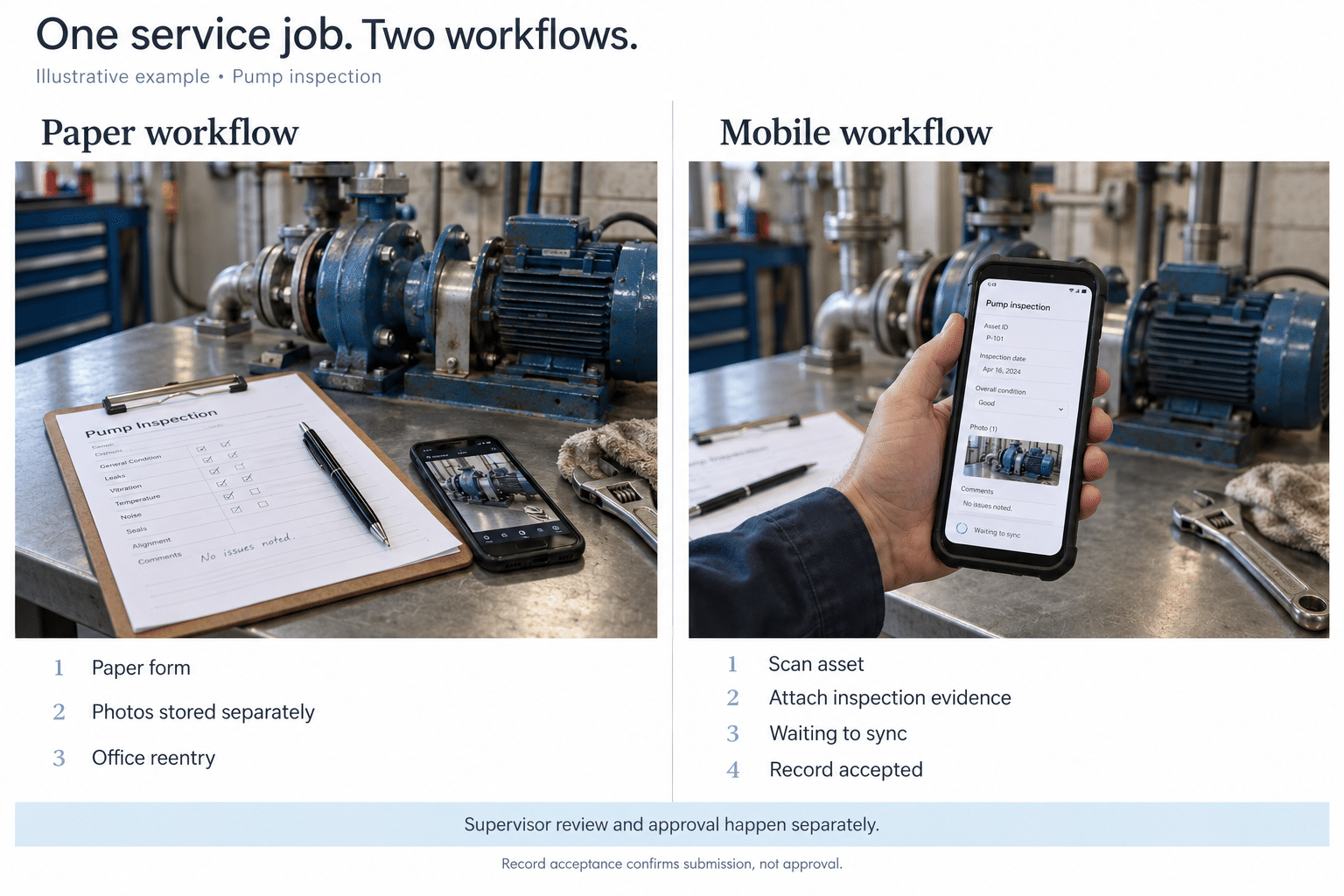
Consider an illustrative industrial service company that captures jobs on paper and enters them into its office system later. The proposed change is a focused field service workflow, not a replacement ERP.
Step | Current process | Proposed mobile process |
|---|---|---|
Prepare the visit | Print a work order and search for documents | Retrieve the assigned job and approved documents before travel |
Identify the asset | Copy the serial number onto the form | Scan or enter the asset ID and confirm the match |
Record the work | Write notes and save photos separately | Attach notes, parts, and photos to the job record |
Handle an exception | Call the office and repeat the background | Flag the issue with its evidence for an assigned reviewer |
Submit the record | Return paperwork for reentry | Queue the record and show when the server accepts it |
Approve and close | Chase missing information | Review exceptions and confirm closure in the business system |
The map exposes the real scope. It needs document control, identity checks, a review path, and integration acknowledgment. A digital form alone would leave several of the existing delays in place.
One sample app workflow
The technician signs in, downloads assigned work, and verifies that the required instructions are available. At the asset, the technician confirms the identifier, completes the checklist, and attaches evidence. Any unresolved condition remains visible for review.
If the connection is unavailable, the record is saved locally and marked “Waiting to sync.” After reconnection, the server validates the submission and returns an accepted status or a specific error. A supervisor approves the work before the connected system records final closure.
Use distinct labels for saved on device, submitted, accepted, and approved. These labels prevent a reassuring check mark from hiding an incomplete business transaction.
Plan ERP MES CRM and IIoT integration early
Manufacturing mobile app development often depends on existing systems. Enterprise resource planning, or ERP, may own orders and inventory. A manufacturing execution system, or MES, may own production records. Customer relationship management, or CRM, may own contacts and commercial activity.
ISA 95 provides models and terminology for enterprise and manufacturing operations integration. It helps frame system boundaries; it does not supply a ready made connector or make a legacy system accessible.
Document the following before estimating the integration work.
Data or action | Typical owner | Requirement to agree |
|---|---|---|
Account pricing and orders | ERP or commerce system | Who may see prices and when a request becomes an order |
Production and inspection records | MES or quality system | Part and lot identifiers, revisions, and approval rules |
Contacts and service history | CRM or service platform | Which records users may view or update |
Equipment readings | Approved IIoT platform or data service | Timestamp, data quality, freshness, and permitted actions |
Manuals and instructions | Controlled document repository | Applicable revision, download rules, and expiry behavior |
For legacy software, confirm supported APIs, authentication, licensing, rate limits, and a test environment. If only scheduled file exchange is available, explain the resulting delay in the interface. Do not promise live availability when the source refreshes overnight.
Define how failed writes are retried without duplicating work orders or purchases. Assign someone to monitor the integration and reconcile errors. The app should not appear successful while the receiving system has rejected the record.
Where customer data spans several tools, this B2B CRM selection guide helps frame the ownership and integration questions.
Specify offline behavior rather than requesting offline mode
Offline support needs a list of permitted tasks. Viewing a downloaded manual is different from entering an inspection or authorizing a purchase with changing prices.
Android’s offline architecture guidance explains the need to reconcile local and network data. For a business team, this means deciding which information wins when two people change the same record and how unresolved conflicts reach a reviewer.
Specify what users can download, how old information may become, which edits can be queued, and which actions must wait for a connection. Test an app restart with unsent work, a device storage limit, an expired login, and reconnection after another user has edited the record.
A revoked user may still possess cached information while a device is disconnected. Agree on local data protection and offline session limits. Remote commands depend on the device being reachable and should not be treated as an immediate remedy for every lost device.
Protect access and make the app usable in the field
Control access to records as well as screens
A distributor should see only the accounts and prices it is entitled to access. A technician may need assigned jobs without the right to change approval rules. Enforce those decisions in the backend, not only by hiding interface controls.
OWASP’s guidance on object level authorization explains why each requested record needs an authorization check. Include tests that attempt to access another customer’s records, even when the user can sign in legitimately.
Use the OWASP Mobile Application Security Verification Standard to scope checks for storage, authentication, network communication, and privacy. Agree on evidence from testing rather than accepting “secure” as a feature description.
Include device management and operational boundaries
NIST’s enterprise mobile device guidance addresses company owned and personally owned devices across their lifecycle. Decide how devices are enrolled, updated, reassigned, and retired. Shared tablets need clear individual accountability and a reliable sign out process.
For equipment data, involve the operational technology team. NIST’s OT security guide treats performance, reliability, and safety as specific concerns. Keep routine mobile access behind approved services. A general business app should not be assumed suitable for direct machine control or as the sole channel for critical alarms.
Test the interface where people work
Use the target devices under actual lighting and connectivity conditions. Check scanning, text size, gloves where applicable, long forms, and interrupted tasks. An operator should be able to identify an error without relying on color alone.
W3C’s mobile accessibility guidance applies accessibility principles to mobile websites and applications. Include readable labels, adequate controls, screen reader behavior, and an understandable error recovery path in acceptance testing.
Calculate value using measured operational assumptions
Separate time returned to the team from cash savings. If technicians spend fewer hours entering notes, the business gains capacity. Cash savings occur only when that capacity changes an actual expense, such as overtime, or produces a measurable additional contribution.
Illustrative calculation only: Suppose 20 technicians each complete four eligible jobs per day over 220 working days. Assume the new workflow saves six administrative minutes per job and is used successfully for 70% of eligible jobs. These are planning assumptions, not c3digitus results or industry benchmarks.
Input or calculation | Illustrative value |
|---|---|
Eligible annual jobs | 20 × 4 × 220 = 17,600 |
Hours returned at 70% successful use | 17,600 × 6 ÷ 60 × 70% = 1,232 hours |
Loaded labor value | Assumed $45 per hour |
Annual value of returned capacity | 1,232 × $45 = $55,440 |
Annual operating cost | Assumed $18,000 |
Net annual capacity value | $55,440 less $18,000 = $37,440 |
Initial implementation cost | Assumed $90,000 |
Simple value based payback | $90,000 ÷ $37,440 ≈ 2.4 years |
This is not a cash payback forecast. It excludes ramp up, financing, taxes, and any unmeasured benefit. Finance and the process owner should determine how much capacity value can actually be realized.
Adoption changes the result substantially. At 40% successful use, the same model produces 704 hours and $31,680 in annual capacity value. After the assumed operating cost, simple value based payback extends to about 6.6 years.
Add fewer order errors or support calls only when you can measure them independently. Do not count the same saved minutes twice. For parts sales, use incremental contribution after relevant costs, rather than treating total app order revenue as new profit.
Understand the costs beyond the first release
A realistic estimate includes discovery, design, development, integration, data cleanup, security testing, deployment, training, and support. Offline conflict handling and complicated permissions can add substantial work even when the app has few screens.
Compare suppliers over a common ownership period. For a three year comparison, include implementation, recurring licenses, hosting, device management, OS updates, integration maintenance, support coverage, and a contingency for changes. Ask what is excluded from the quote and what assumptions could change it.
Set ownership terms for source code, repositories, store accounts, cloud environments, documentation, and data exports. Identify who can release a fix if the original supplier becomes unavailable. Custom industrial software development brings control only when the commercial and technical handover support that control.
The app may not need a public store listing. Apple Custom Apps and managed Google Play private apps offer organizational distribution options. Confirm eligibility, review requirements, account ownership, and user access before choosing a route.
Pilot one workflow before expanding
Start with a representative team, including people who use the current process reluctantly or work in difficult conditions. Record baseline task time, completion errors, and support effort before the pilot. Then compare similar jobs during the trial.
Agree on acceptance measures with operations and IT. Useful measures include the share of eligible jobs completed through the app, time per completed task, missing records, failed synchronization, and support requests. Downloads and logins show access, but they do not establish that the workflow improved.
Name an operational owner for process rules, an IT owner for access and integrations, and a supplier contact for defects. Include a fallback procedure and a decision on when duplicate paper entry ends. Otherwise, people may be asked to maintain two processes indefinitely.
If users cannot yet evaluate the proposed workflow, a clickable prototype through The Tech Hero can make it testable before a full build. A prototype helps validate interaction and scope; it does not prove production security, integration reliability, or deployment readiness.
What the c3digitus 2EC project demonstrates
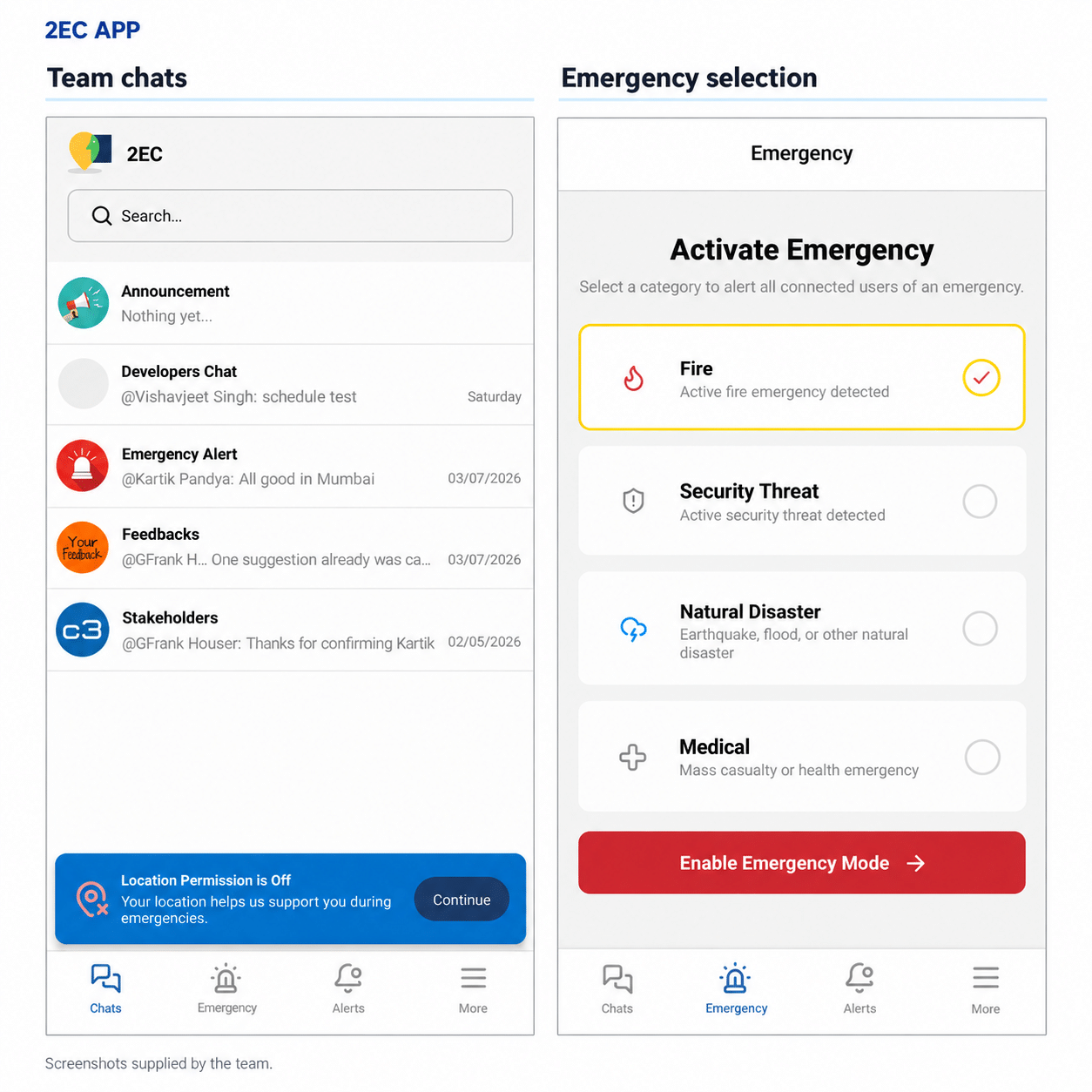
The c3digitus 2EC project serves organizations responsible for minors, including schools and youth programs. Its public Play Store listing describes group communication, messaging, and emergency coordination.
The relevant connection to industrial apps is the need to coordinate people and information through a mobile interface. The workflows and risks remain different. This example does not establish manufacturing performance results or validate a particular industrial deployment.
For an industrial project, ask to see the proposed workflow, integration approach, access model, and test plan. Those details provide a firmer basis for selecting a development partner than a list of technologies alone.
Define the workflow you want to improve
Bring one recurring problem to the first development discussion: who performs the task, how often it happens, what delays it, and which systems hold the information. Include a representative form or work order and the exceptions that usually require a phone call.
c3digitus mobile app development services cover strategy, integrations, interface design, testing, deployment, and maintenance for iOS and Android. If you are evaluating an app for a plant, field team, or customer account, book an intro call to discuss the workflow and requirements.
The immediate goal is a decision you can defend: use existing software, improve a portal, or scope a custom application around a measurable operational need.